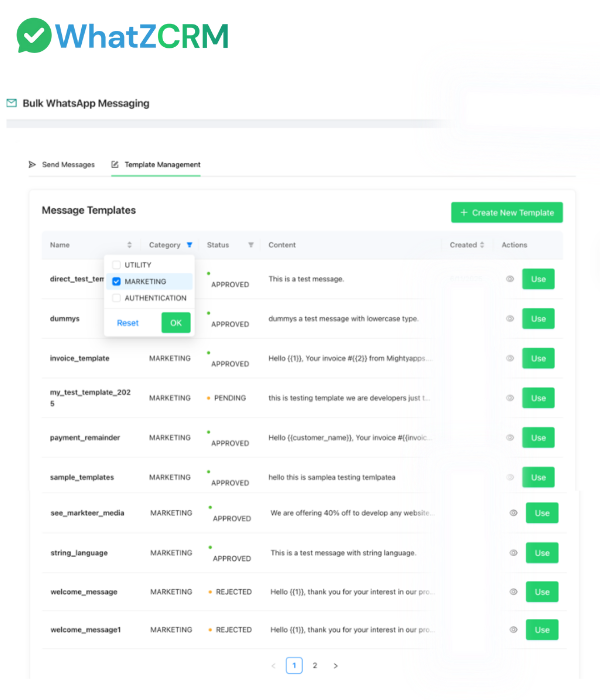
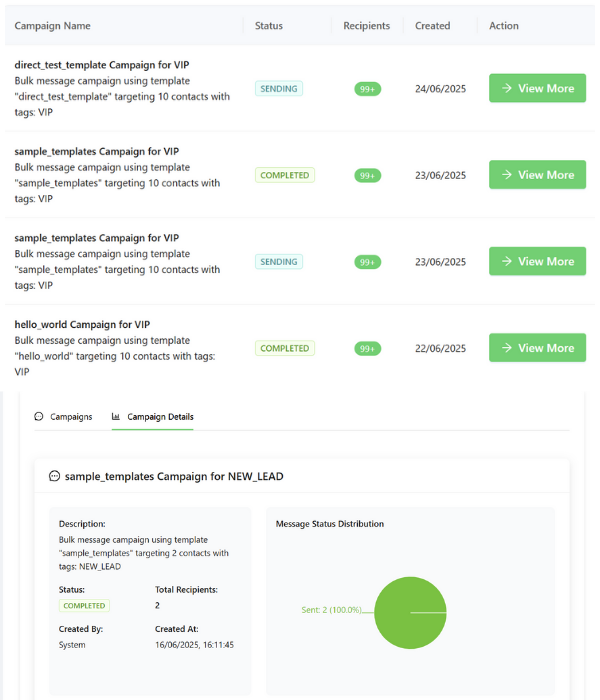
WhatZCRM's WhatsApp Template Library allows you to create, manage, and reuse pre-approved WhatsApp message templates for every business scenario. From marketing campaigns and payment reminders to support updates and customer notifications, the library ensures faster communication without the hassle of re-creating messages every time.
Rewriting messages repeatedly slows down teams and increases the likelihood of errors. With our template library, you can access ready-made, API-compliant templates, personalize them instantly, and send them at scale—all while ensuring accuracy and consistency.
Store all sales, support, operations, and marketing templates in one place for easy access.
Use dynamic variables like {{name}}, {{order_id}}, or {{date}} to tailor every message.
Attach images, PDFs, or clickable call-to-action buttons to make messages more engaging.
Send WhatsApp Business API–ready templates that get approved quickly.
Stay aligned with WhatsApp's rules for post-24-hour communication.
Speed up responses, reduce repetitive work, and maintain your brand voice across all chats.
Streamline your messaging operations with powerful tools designed to create, manage, and deploy consistent WhatsApp communications across all business functions.
Easily create pre-approved WhatsApp templates designed for different business needs such as promotions, payment reminders, delivery notifications, or customer support updates. Once saved in your library, these templates can be reused at any time, ensuring faster communication and consistency across campaigns.
Go beyond generic messages by inserting CRM variables like {{first_name}} or {{order_id}}. This allows you to personalize every interaction while still reaching thousands of contacts at once, making each message feel relevant and human.
Submit your templates for WhatsApp Business API approval directly within WhatZCRM. Once approved, they become instantly available for campaigns, broadcasts, and one-on-one conversations, reducing waiting times and enabling your team to move faster.
Sales, support, and marketing teams can all access and share the same template library. This ensures brand tone and accuracy remain consistent across departments while reducing the effort of manually recreating or editing messages.
Enhance your templates' interactivity by incorporating PDFs, product catalogs, images, price lists, videos, or clickable call-to-action buttons. Rich media makes conversations more engaging, helps explain details more effectively, and encourages recipients to take prompt action.
Organize your template library by categories such as sales, marketing, support, or operations. This structured approach helps teams find the right template quickly, avoid confusion, and maintain efficiency, especially when handling high-volume messaging.
Connect templates to your CRM workflows so they trigger automatically based on events like new lead creation, payment confirmation, order dispatch, or ticket resolution. This automation ensures timely communication without manual intervention.
Access detailed analytics that show how each template performs in terms of delivery, open rates, replies, and conversions. With these insights, you can identify your most effective templates, refine underperforming ones, and continually optimize for better engagement.
Simple 5-step process to create, organize, and deploy pre-approved WhatsApp templates for consistent business communication.
Build brand-new templates from scratch or quickly import existing ones into the library. Submit them for WhatsApp Business API approval in just a few clicks and start using them right away.
Group templates by department, campaign, or use case so your teams can instantly locate the right message when needed. This keeps workflows smooth and avoids repetitive work.
Add CRM variables such as customer name, product, or appointment time, and enrich templates with PDFs, images, or buttons. This makes every message more engaging while staying reusable.
Use stored templates immediately for one-to-one replies, broadcasts, or automated workflows. Everything is managed directly from your WhatZCRM dashboard for fast and efficient messaging.
Track how each template performs by reviewing delivery, read, and reply metrics. Use these insights to refine content and improve future communication strategies.
Designed for teams across industries who want to streamline communication, maintain consistency, and save time with pre-approved, reusable messaging templates.
Send timely follow-ups, meeting confirmations, and personalized offers using pre-approved templates. This not only saves time but also boosts consistency and improves conversion rates.
Launch promotions, product announcements, and seasonal campaigns instantly using reusable templates. Marketing teams can stay agile while ensuring messages remain compliant and on-brand.
Automate order confirmations, shipping updates, and payment notifications with accurate pre-approved templates. This reduces manual effort and ensures customers are always informed in real time.
Easily share class reminders, fee payment alerts, and exam schedules with students and parents. Using compliant, reusable templates helps institutions save effort and maintain timely communication.
Hear from business professionals who have streamlined their messaging operations and improved team efficiency with WhatZCRM's Template Library
"The template library has cut our campaign prep time in half. Now we can launch promotions instantly with pre-approved messages."
"Support responses are so much faster. Our agents now rely on templates for ticket updates, saving hours of typing each week."
"With personalized templates, our follow-ups feel human but scale easily. It's a huge win for our sales team."
Find answers to common questions about the WhatsApp Template Library in WhatZCRM
The WhatsApp Template Library is a centralized hub of pre-approved message templates. It enables businesses to create, store, and send consistent, compliant, and personalized messages without starting from scratch each time.
Yes. You can design and save unlimited templates for promotions, reminders, event updates, support messages, and follow-ups. Each template can include personalization fields and media for greater impact.
Yes. The template feature works within the WhatsApp Business API to ensure compliance, especially when sending messages outside the standard 24-hour response window.
Yes. The library is accessible to sales, support, operations, and marketing teams, making it simple to use consistent, approved templates across your organization.
Yes. Personalization is possible using dynamic CRM variables such as {{name}}, {{order_id}}, or {{date}}, so every message feels relevant and customer-specific.
Yes. Every template goes through WhatsApp's official approval process, ensuring compliance with WhatsApp Business API rules and reducing the risk of rejection or blocking.
Yes. Templates can include PDFs, images, product catalogs, videos, and clickable call-to-action buttons, creating engaging and interactive customer experiences.
By using pre-approved templates, teams eliminate repetitive work, respond faster, and maintain consistent brand tone, saving valuable time while improving communication quality.
Yes. Templates are flexible and can be used for one-time notifications like promotions or recurring updates like appointment reminders, subscription renewals, and payment confirmations.
Setup is quick. Once your WhatsApp Business API account is connected, templates can be created, submitted for approval, and deployed within hours.
Eliminate repetitive typing, stay compliant, and launch faster campaigns with WhatZCRM's WhatsApp Template Library.