WhatsApp Team Collaboration

Collaborate Seamlessly Across Teams with WhatsApp

WhatsApp Team Collaboration Tools make it easy for your sales, support, and operations teams to work together in one shared inbox. Assign chats, track performance, share notes, and manage customer interactions all in one place, without switching between apps.

WhatsApp Team Collaboration Dashboard
OUR EXPERTISE

Why Use WhatsApp Team Collaboration in WhatZCRM

In fast-moving businesses, missed messages or delayed responses mean lost opportunities. WhatZCRM's collaborative WhatsApp workspace ensures every chat is tracked, assigned, and resolved matter the size of your team.

Share One WhatsApp Number

Share one WhatsApp number with all team members for consistent customer communication.

Assign Chats Instantly

Assign chats instantly to agents or departments for faster response times.

Track Performance

Track responses and agent performance with real-time analytics.

Add Internal Notes

Add internal notes for your team only to share context and information.

Handover Chats

Handover chats without losing history for seamless customer experience.

Integrate with CRM

Integrate with CRM for a full customer view and complete context.

What You Can Do with WhatsApp Team Collaboration in WhatZCRM

Empower your teams to work together efficiently with powerful collaboration tools designed to streamline communication, improve response times, and enhance customer satisfaction.

Manage All Conversations from One Shared Inbox

Centralize every incoming and outgoing customer message in one unified inbox. No more juggling multiple devices, switching apps, or missing chats; every team member can see the same conversation thread in real time, ensuring nothing slips through the cracks.

Assign & Route Chats Automatically

Set up intelligent routing rules to automatically send new chats to the right agent, department, or team based on keywords, tags, language, or customer history. This ensures faster responses and more relevant support for every customer query.

Leave Internal Notes & Context

Add private notes inside customer chats to share important background information with your teammates. This way, whoever replies next has the full context, improving accuracy, personalization, and consistency in communication.

Track Agent Performance with Live Analytics

Access real-time metrics on chat volumes, first response times, and resolution rates. Identify top-performing agents, spot areas for improvement, and use data-driven insights to refine your team's customer engagement strategy.

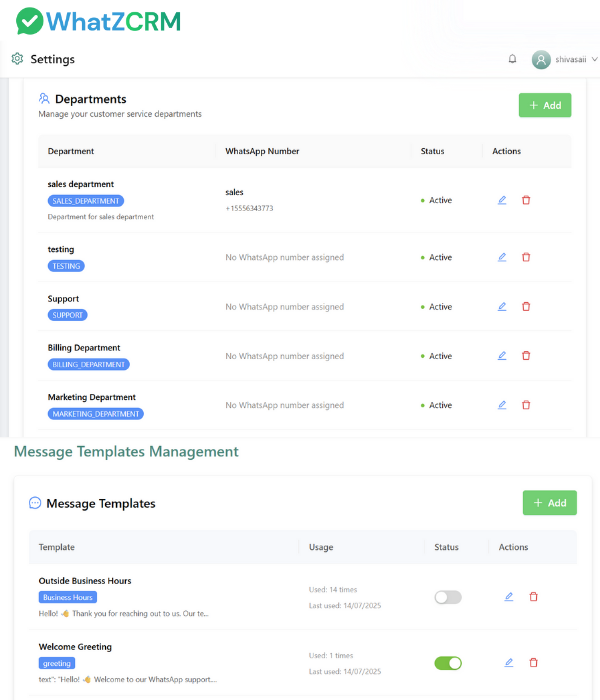
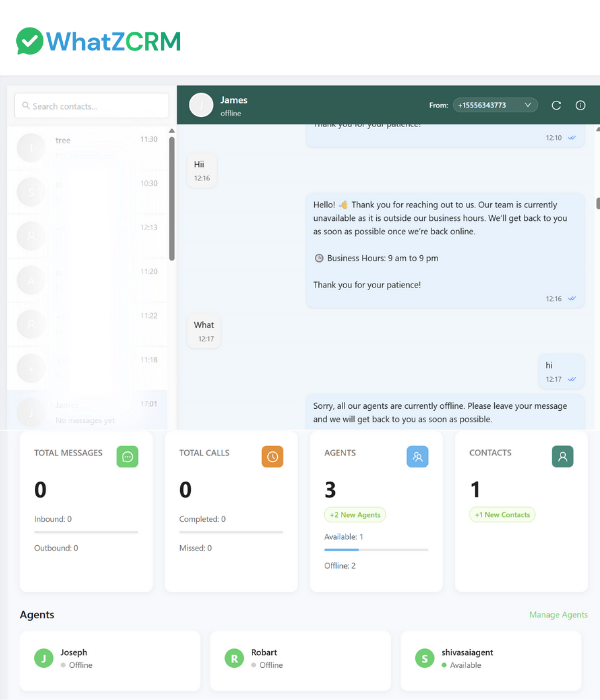
WhatsApp Team Collaboration Dashboard
WhatsApp Team Performance Dashboard

Enable Smooth Multi-Device Access

Allow your entire team to log in from anywhere—desktop, tablet, or mobile—while responding from the same official WhatsApp number. This keeps the workflow seamless, whether your team is in-office or remote.

Integrate with CRM, Helpdesk & More

Connect WhatZCRM to your CRM, helpdesk, or project management tools to log chats automatically, update deal stages, trigger follow-ups, or create support tickets directly from the WhatsApp interface.

Collaborate Across Sales, Support & Operations

Empower your cross-functional teams to work together within a single, streamlined platform. Sales teams can follow up on leads, support teams can resolve issues, and operations teams can coordinate logistics, all within the same chat thread.

Ensure No Customer Message Is Missed

With centralized communication, real-time notifications, and shared visibility, WhatZCRM makes sure no customer message falls through the cracks. Every query is tracked, every response is logged, and every team member stays in the loop.

HOW DOES IT WORK

How WhatsApp Team Collaboration Works in WhatZCRM

Simple setup process to get your entire team collaborating on WhatsApp within minutes.

Connect Your WhatsApp Number

Easily link your WhatsApp Business API account to WhatZCRM within minutes Bringing all customer conversations into one centralized hub

Invite Your Team

Add agents, managers, and departments Role-based permissions for secure access Organized team structure

Set Smart Routing Rules

Define how incoming chats are distributed Round-robin, by keyword, or department Every query reaches the right person instantly

Collaborate in Real Time

Agents can reply, leave private notes Transfer chats without losing context Smooth handovers and consistent experiences

Monitor & Optimize Performance

Live dashboards for chat volumes and response times Track workloads and resolution rates Improve team productivity and customer satisfaction

Ready to Transform Your Team Communication?

WhatsApp CRM for Team Collaboration

Designed for teams that want to streamline communication, improve response times, and deliver exceptional customer experiences through collaborative WhatsApp management.

Sales Teams: Accelerate Lead Handling

Respond to new inquiries instantly, assign hot leads to the right sales reps without delay, and maintain consistent follow-ups for faster conversion.

Support Teams: Resolve Issues Faster

Automatically route incoming support requests to the most qualified specialist based on query type or customer profile. Improve first-contact resolution rates and ensure customers get accurate answers quickly.

Operations Teams: Streamline Coordination

Manage order updates, track delivery progress, and resolve operational bottlenecks without switching between multiple tools for seamless coordination.

Marketing Teams: Run Campaigns with Handoffs

Work together on promotional campaigns, monitor customer engagement in real time, and instantly forward high-intent leads to the sales team for faster conversion.

TESTIMONIALS

What Our Clients Say

Hear from teams who have transformed their collaboration and customer communication with WhatZCRM

"With WhatZCRM, every chat is tracked and assigned. Our response time improved by 45% and customers are happier than ever."

Alex Carter
Alex Carter
Customer Success Manager
Tech Startup

"Internal notes give our agents instant context, leading to faster resolutions and better customer feedback."

Emily Johnson
Emily Johnson
Support Team Lead
E-commerce Platform

"Multi-agent access lets our remote team work like they're in one office. We've doubled our response rate."

Michael Anderson
Michael Anderson
Operations Director
Digital Agency
FAQ

Frequently Asked Questions

Find answers to common questions about WhatsApp Team Collaboration

It's a centralized WhatsApp workspace that allows multiple team members to manage a single WhatsApp Business number together. Every message is visible to the right people in real time, ensuring no missed opportunities and complete customer context at all times.

Yes. You can assign chats manually to a chosen agent or set up intelligent auto-routing rules that send messages to the right person or department instantly, based on keywords, tags, customer profile, or history.

No. Internal notes are 100% private to your team and never visible to customers. These notes help agents share context, highlight key details, and pass important information between departments without affecting the customer conversation.

There's no limit on agent access. You can add as many sales, support, and operations members as your plan supports, enabling your entire organization to respond from one branded WhatsApp account without any conflicts.

Yes. All WhatsApp chats, tags, notes, and attachments sync directly with your CRM or helpdesk in real time. This eliminates manual data entry and ensures every customer interaction is stored for future reference and reporting.

Absolutely. You can monitor essential KPIs like first response time, resolution rates, number of handled chats, and customer satisfaction scores. This makes it easier to reward top performers and identify areas that need improvement.

Yes. WhatZCRM supports cloud-based, multi-device logins, so your team can respond to chats from anywhere, whether they're in the office, working remotely, or on the move, without losing visibility or control.

Yes. You can organize your workspace by departments such as Sales, Support, and Operations, each with its own routing rules, dedicated team members, and custom permissions for smooth collaboration.

Yes. Chats can be reassigned or transferred instantly between team members without losing the conversation history, so customers never have to repeat themselves, and service continuity is maintained.

Most teams can go live within 2-5 business days after their WhatsApp Business API account is approved. The onboarding process is guided, so your team can be fully trained and operational almost immediately.

Get Started Today

Boost Team Efficiency and Deliver Better Customer Experiences with WhatZCRM

Built to Work with WhatsApp Business API