WhatsApp Chat Templates

Automate Conversations at Scale with WhatsApp Chat Templates

WhatsApp Chat Templates in WhatZCRM enable you to create, personalize, and automate pre-approved messages for various business needs, including marketing, support, sales, and operations. Whether you're sending a payment reminder, appointment confirmation, or re-engagement campaign, templates help you connect instantly, without breaking WhatsApp's messaging rules.
WhatsApp Chat Templates
OUR EXPERTISE

Why Use WhatsApp Chat Templates?

WhatsApp Chat Templates are essential for scaling communication beyond session windows while maintaining consistency, compliance, and automation. With pre-approved templates, teams can send structured messages instantly, improving response times, campaign performance, and customer satisfaction without manual effort.

Send Messages Beyond Reply Window

Send messages beyond the 24-hour reply window with pre-approved templates that maintain instant communication capability.

Automate Conversations

Automate conversations with zero manual typing using smart templates that respond instantly to customer inquiries.

Stay Fully Compliant

Stay fully compliant with WhatsApp Business API policies while maximizing your messaging reach and effectiveness.

Personalize Messages at Scale

Personalize messages at scale using CRM data to create meaningful connections with thousands of customers simultaneously.

Launch Campaigns Without Coding

Launch campaigns and workflows without coding using our intuitive drag-and-drop template builder and automation tools.

Improve Message Consistency

Improve message consistency across teams and departments with standardized templates that maintain your brand voice.

What Can You Do With WhatsApp Chat Templates in WhatZCRM?

Create, personalize, and automate pre-approved messages with powerful tools designed to streamline communication, improve response times, and scale your messaging operations.

Build with No Code

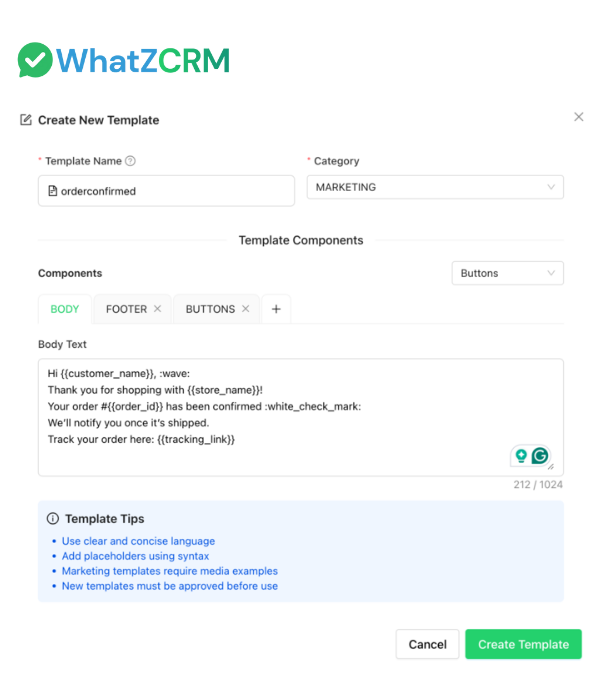
Create WhatsApp message templates using a simple drag-and-drop editor. Add text, dynamic variables, buttons, and media, no coding required.

Official API Approval Workflow

Submit templates directly for Meta's WhatsApp Business API approval, track status, and resubmit, all from one dashboard.

Multilingual Messaging

Design templates in 50+ languages to connect with global and regional audiences using fully localized content.

AI-Powered Template Recommendations

Let AI suggest the most relevant templates based on customer intent, chat history, or campaign goals to speed up response time.

WhatsApp Chat Templates Builder
WhatsApp message template

Smart Template Organization

Organize templates by category marketing, utility, notifications, or alerts—so teams can find and send them instantly.

Media & Interactive Button Support

Add PDFs, images, or videos to templates and include quick reply or Call-to-Action buttons for higher engagement.

Campaign & Workflow Integration

Use templates in broadcasts, chatbot flows, onboarding sequences, or automation rules to streamline customer journeys.

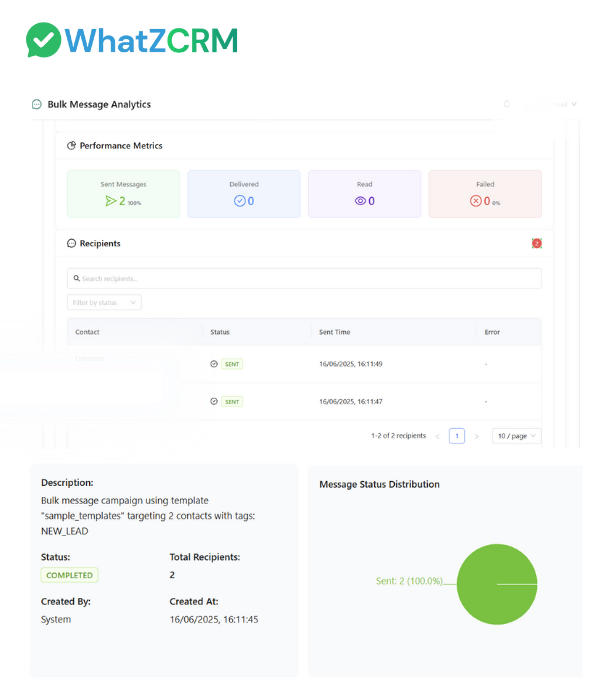
Template Performance Tracking

Monitor delivery, reads, replies, and click-through rates in real time to continually improve messaging results.

HOW DOES IT WORK

How WhatsApp Chat Templates Work in WhatZCRM?

WhatZCRM's streamlined process makes it easy to create, approve, and deploy WhatsApp chat templates for automated messaging at scale.

Choose or Create a Template

Use prebuilt templates or create your own Visual template builder with multilingual support Add text, variables, buttons, and media

Submit for Approval

Send template to Meta's WhatsApp Business API Track approval status in real-time One-click submission process

Add Variables and Media

Customize with dynamic fields Add customer name, booking ID, etc. Attach files and media as needed

Deploy in Workflows

Use in drip campaigns and auto-replies Integrate with onboarding flows Set up support notifications

Track Delivery and Performance

Monitor message status (sent, delivered, read) View engagement insights Analytics dashboard reporting

Ready to Scale Your Business with WhatZCRM?

WhatsApp Chat Templates For?

WhatsApp Chat Templates are designed for teams across all departments who want to automate communication, improve response times, and maintain consistency in their messaging.

For Marketing Teams

Launch WhatsApp campaigns, automate re-engagement, and share product updates with templates that convert.

For Sales Teams

Send lead follow-ups, meeting reminders, and price quotes - instantly and with a personal touch.

For Support Teams

Confirm tickets, send status updates, and share resolution details without typing the same message every time.

For Operations & Service Providers

Use templates to confirm bookings, share instructions, or send alerts - all triggered automatically.

TESTIMONIALS

What Our Users Say About WhatZCRM?

Hear from professionals who have transformed their communication and improved response times with WhatsApp Chat Templates

"With Chat Templates, we reply to new inquiries in under 10 seconds. Our lead conversion rate improved by 35%."

Agarwal D.
Agarwal D.
Sales Manager
Business Services

"Using templates with media helps us explain products better. Our response rate shot up by 60%."

Kumar R.
Kumar R.
E-commerce Founder
Online Retail

"The approval flow is super smooth. No more going back and forth with Meta's template system."

Sandhya M.
Sandhya M.
CRM Lead
Technology Company
FAQ

Frequently Asked Questions

Find answers to common questions about WhatsApp Chat Templates

They are pre-approved message formats used to automate WhatsApp communication through the WhatsApp Business API.

Yes, you can use our visual builder to create custom templates with text, buttons, media, and dynamic variables.

Yes. WhatZCRM allows you to submit templates for approval within the dashboard and monitor the status.

Absolutely. Create multilingual versions of the same template for regional targeting.

Yes. Use variables like {{name}}, {{order_id}}, or {{appointment_time}} to auto-fill user-specific details.

Yes. Templates can include media files for rich engagement.

Session messages happen during a 24-hour window; templates are used to message users outside that window with pre-approved content.

Yes. Use templates in bulk campaigns, drip sequences, or via webhook-based automation.

Most templates are approved by Meta within a few hours, depending on compliance with WhatsApp policies.

Yes. We offer ready-to-use templates for healthcare, real estate, finance, education, e-commerce, and more.

Get Started Today

Templates that help you save time, ensure consistency, and grow faster.

Built to Work with WhatsApp Business API