
Most businesses don’t plan to outgrow WhatsApp Business Web; they just wake up one day juggling four tabs, a spreadsheet of leads, and a colleague asking, “Wait, did anyone reply to that customer yet?” WhatsApp Business Web solves the first problem every growing business hits: typing on a phone all day is slow. It doesn’t solve the second one, knowing who owns which conversation and whether it turned into a sale.
This guide walks through what WhatsApp Business Web is, exactly what it can and can’t do in 2026, and where a full WhatsApp CRM like WhatZCRM picks up the slack.
What Do You Know About WhatsApp Business Web?
WhatsApp Business Web is the browser-based mirror of your WhatsApp Business account. You open web.whatsapp.com, scan a QR code with your phone, and every chat, contact, and label on your phone shows up on your desktop, no separate account, no separate inbox.
It’s not a different product from the mobile app. It’s the same account, projected onto a bigger screen with a keyboard attached. That’s the whole value proposition: type faster, see more, switch less.
Also Read: Step-by-Step Guide for Setting Up WhatsApp Business API for Your Business
How to Log In to WhatsApp Business Web
Setup takes under a minute and works the same way whether you’re on a browser tab or the downloadable desktop app for Windows and Mac.
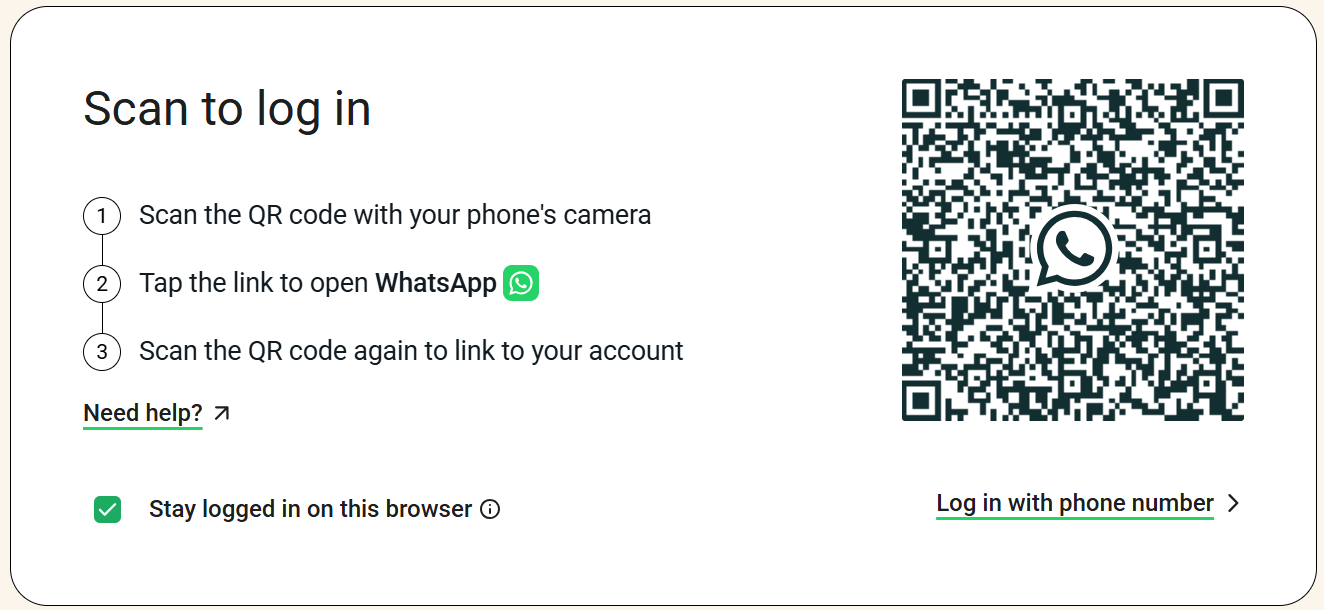
- Open web.whatsapp.com in your browser, or launch the WhatsApp desktop app.
- Open WhatsApp Business on your phone, tap the menu (Android) or Settings (iPhone), and go to Linked Devices.
- Tap “Link a Device” and point your phone’s camera at the QR code on your screen.
- Wait for your chats, contacts, and business profile to load automatically, and you’re ready to reply from your desktop.
To log out, either open Linked Devices on your phone and remove the session, or click the menu inside WhatsApp Web/Desktop and select Log Out. If the QR code won’t scan, the usual fixes are a brighter screen, a refreshed page, or a quick check on your internet connection.
What You Can Actually Do With It
Inside WhatsApp Business Web, day-to-day, you get:
- Quick Replies for answering repeated questions without retyping them
- Labels to tag chats as, say, New Lead or Payment Pending
- Business profile display — hours, address, catalog, website link
- Product catalog access so customers can browse without leaving the chat
- Greeting and away messages to acknowledge incoming chats automatically
- File sharing for documents, images, and videos, which is noticeably faster with a keyboard and a real file system than on mobile devices
For a solo operator or a two-person shop, this genuinely covers a lot. The friction shows up once the volume or team size grows.
Also Read: WhatsApp Business API Explained with Benefits, Setup & Use Cases
WhatsApp Business Web vs App vs WhatsApp CRM
The honest way to compare these three isn’t to ask which is better; it’s to ask “which job is each one built for?”
| Capability | WhatsApp Business Web | WhatsApp Business App | WhatZCRM (WhatsApp CRM) |
| Access point | Browser or desktop app | Mobile phone | Web dashboard + mobile |
| Team collaboration | One login, no true multi-agent split | Single-device, single-user | Shared team inbox with assignment & internal notes |
| Automation | Greeting/away messages only | Same as Web | AI chatbot builder + drip sequences |
| Broadcasts | ~256 contacts per list | ~256 contacts per list | Segmented broadcasts to thousands, no manual list caps |
| Lead & deal tracking | None, it’s a chat window | None | Full pipeline with stages, deal value, and forecasting |
| Proposals & invoices | Manual file sharing only | Manual file sharing only | Built-in proposal and invoice sharing with tracking |
| Segmentation | Labels only | Labels only | AI-powered segmentation by behavior and engagement |
| Reporting | None | None | Analytics dashboard: response times, campaign performance |
| Best fit | Solo founder replying from a laptop | On-the-go individual replies | Teams that need pipeline visibility, not just a chat log |
WhatsApp Business Web and the App are really the same tool on two screens. WhatZCRM is a different category entirely; it uses the WhatsApp Business API underneath, so the messaging stays WhatsApp-native, but everything wrapped around it (pipeline, automation, reporting) is built for a team that’s trying to close deals, not just answer chats.
Why WhatsApp Falls Short for Business Web Communication
- No shared inbox: Only one number and one active session can genuinely represent “the business” at a time. Multiple people reading and replying from linked devices still means no assignment, no “this chat belongs to Priya,” and a real risk of two teammates replying to the same customer.
- No pipeline: A label such as “New Lead” indicates that a chat exists. It doesn’t tell you the deal size, the follow-up date, or which stage the customer is at. Once you have more than a handful of live leads, tracking that in your head or in a side spreadsheet starts costing you sales.
- Broadcast caps: Lists top out at around 256 contacts, which is workable for a small list but restrictive once your customer base grows past a few hundred.
- No chatbot. Away messages are static text. There’s no logic, no FAQ handling, no lead qualification; every conversation needs a human on the other end, all the time.
- No reporting. There’s no way to see average response time, campaign open rates, or which agent is handling the most chats. You’re flying blind on team performance.
5 Signs Your Business Needs an Upgrade with WhatsApp Business Web
- More than one person needs to reply to customers under the same number
- You’re tracking leads in a spreadsheet next to your WhatsApp tab
- You want to send a proposal or invoice and get notified when it’s viewed
- You need to segment customers by purchase history, not just a label
- You’re sending broadcasts often enough that the 256-contact cap is a real bottleneck
If two or more of these sound familiar, the fix usually isn’t to use WhatsApp Web better; it’s to move the business layer onto something built for it.
How Does WhatsApp Business Web with WhatZCRM Help Grow Your Business?
WhatZCRM runs on the WhatsApp Business API, so messaging stays fully WhatsApp-native; customers never know the difference. What changes are happening around the chat:
- Shared Team Inbox: Every conversation is assignable, so nothing sits unanswered because “someone else probably has it.”
- AI Chatbot Builder: Qualify leads, answer FAQs, and book appointments automatically, then hand off to a human agent when the conversation needs one.
- Deal Pipeline & CRM: Every chat can become a tracked deal with stage, value, and owner, so a lead never quietly disappears.
- Drip Automation & Broadcast Campaigns: Segmented, scheduled sequences that reach thousands of contacts, not a manually managed list of 256 people.
- Proposal & Invoice Management: Send, track, and get paid without leaving the WhatsApp conversation.
- AI-Powered Segmentation: Automatically group customers by behavior and engagement, rather than manually applying labels to each chat.
In short, WhatsApp Business Web is where a conversation happens. WhatZCRM is where that conversation becomes a tracked, reportable part of your sales pipeline.