

The SaaS industry is growing rapidly, and customer expectations are changing along with it. Businesses today need more than just a good software product. They need faster customer support, personalised communication, effective lead management, and consistent customer engagement.
However, managing customer conversations across emails, phone calls, website forms, and different messaging platforms can become difficult as a SaaS business grows.
This is where the WhatsApp Business API for SaaS becomes valuable. It allows software companies to connect with customers through automated messaging, organised conversations, and integrated CRM workflows.
By combining WhatsApp Business API with a CRM platform like WhatZCRM, SaaS businesses can simplify communication, manage leads, automate follow-ups, and build better customer relationships.
Let’s understand how WhatsApp Business API works and how SaaS companies can use it to scale their operations.
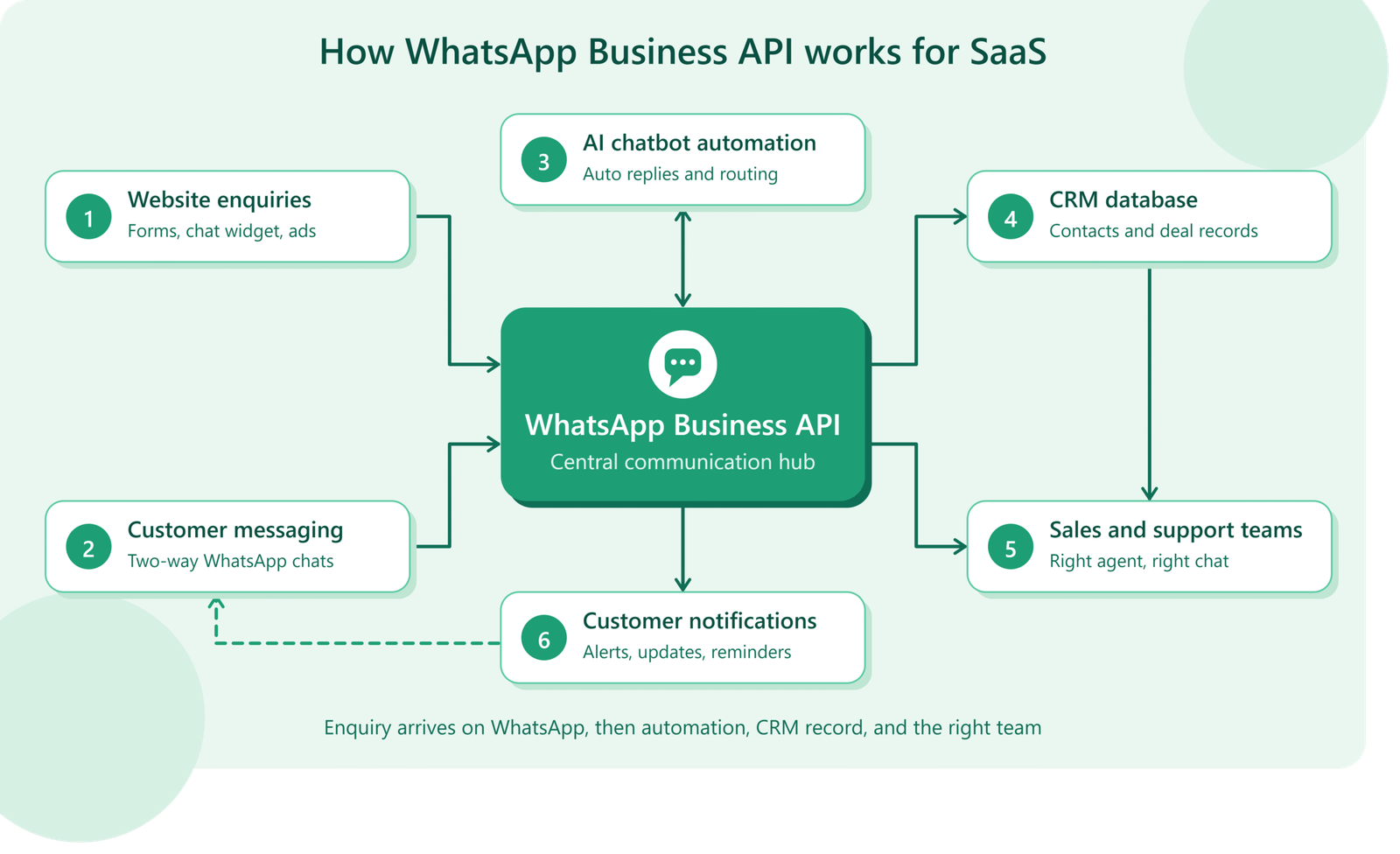
What Do We Know About WhatsApp Business API for SaaS Businesses? And How It Works
WhatsApp Business API, also known as the WhatsApp Business Platform, enables businesses to communicate with customers at scale through WhatsApp.
Unlike the standard WhatsApp Business App, the API is designed for businesses that need multiple agents, automated messaging, CRM integration, and structured customer communication.
For SaaS companies, it creates an opportunity to connect WhatsApp conversations with their existing business processes.
Businesses can use WhatsApp Business API to:
- Send automated customer notifications and updates.
- Respond to customer enquiries through shared inboxes.
- Manage sales and support conversations.
- Send appointment reminders and service notifications.
- Automate lead follow-ups.
- Connect customer communication with CRM systems.
- Monitor messaging performance and engagement.
Understanding the platform’s capabilities is important before implementing it. Read our complete guide to WhatsApp Business API to learn more about how it supports business communication.
Why Do SaaS Businesses Need WhatsApp Business API?
As SaaS companies acquire more customers, communication becomes increasingly complex. A growing customer base means more enquiries, onboarding requests, product questions, payment reminders, and support conversations.
Traditional communication methods alone may not provide the speed and organisation that customers expect.
Here are some reasons why WhatsApp Business API is useful for SaaS companies.
1. Faster Customer Communication
Customers often expect quick responses when they have questions about a product, subscription, or service.
WhatsApp provides a familiar communication channel where businesses can respond to enquiries, share product information, and provide important updates.
With automated replies and team inbox functionality, SaaS companies can manage incoming conversations more efficiently.
2. Better Lead Management
Generating leads is only one part of SaaS growth. Businesses also need to qualify prospects, understand their requirements, and follow up at the right time.
WhatsApp Business API helps businesses maintain direct communication with potential customers.
When integrated with a CRM, conversations can be connected to customer profiles, lead details, and sales activities. This makes it easier for sales teams to track enquiries and manage opportunities.
A well-connected system can make a significant difference. Learn how CRM integration with WhatsApp turns conversations into customers.
3. Improved Customer Engagement
Regular communication helps SaaS companies maintain relationships with their customers.
Businesses can use WhatsApp to share:
- Product announcements.
- New feature updates.
- Service notifications.
- Subscription reminders.
- Important account information.
- Customer onboarding messages.
Relevant and timely communication helps customers stay informed throughout their journey.
4. Reduced Manual Work Through Automation
Manually responding to every enquiry and sending individual reminders can consume valuable time.
WhatsApp automation helps SaaS businesses handle repetitive communication through predefined workflows.
For example, when a potential customer submits an enquiry, an automated workflow can send an acknowledgement, collect basic information, and notify the appropriate sales representative.
Businesses can explore different WhatsApp automation tools to understand how automated workflows can simplify repetitive tasks and improve customer communication.

7 Ways SaaS Businesses Can Scale with WhatsApp Business API
WhatsApp Business API can support different stages of the SaaS customer journey. Here are seven practical ways businesses can use it.
1. Automate Lead Capture and Qualification
SaaS companies receive leads through websites, landing pages, social media advertisements, and other marketing channels.
Connecting these lead sources with WhatsApp automation helps businesses respond quickly.
For example:
- A visitor clicks a WhatsApp advertisement.
- The visitor starts a conversation.
- An automated chatbot welcomes the prospect.
- The chatbot asks about their business requirements.
- The lead is assigned to the relevant sales representative.
This process reduces manual lead handling and helps sales teams manage incoming opportunities.
A WhatsApp lead generation bot can help businesses capture enquiries, qualify prospects, and guide potential customers towards the next step.
2. Simplify Customer Onboarding
Customer onboarding is an important stage in the SaaS journey. New users may need assistance with account setup, product features, integrations, and initial configuration.
WhatsApp automation can make onboarding more organised.
Businesses can send welcome messages, setup instructions, helpful resources, and onboarding reminders.
For example, after a customer registers for a SaaS product, the system can automatically send a welcome message with the next steps.
This helps customers understand how to get started without waiting for manual assistance.
3. Build a Centralised Customer Support System
When multiple support agents handle customer conversations through separate devices or numbers, maintaining communication history becomes difficult.
A WhatsApp CRM with a shared team inbox allows multiple agents to manage conversations from one place.
Support teams can:
- Assign conversations to specific agents.
- Review previous customer interactions.
- Track pending enquiries.
- Manage follow-ups.
- Maintain organised communication records.
This improves team coordination and helps customers receive more consistent support.
4. Automate Subscription and Payment Reminders
SaaS businesses often operate through monthly or annual subscription models.
Managing renewals and payment reminders manually can create additional work for finance and customer support teams.
With WhatsApp automation, businesses can send timely reminders about upcoming renewals, pending payments, and subscription-related updates.
These notifications help customers stay informed and make subscription management easier.
Businesses should ensure that their messages follow applicable WhatsApp policies and customer consent requirements.
5. Improve Customer Retention and Re-engagement
Acquiring new customers is important, but retaining existing customers is equally valuable for SaaS growth.
Businesses can use WhatsApp to reconnect with inactive users, share relevant product updates, and communicate useful resources.
For example, if a customer has not used a particular feature, a business can send an educational message explaining how that feature works.
Personalised and relevant communication can encourage customers to explore more product features and remain engaged.
6. Connect WhatsApp with CRM and Business Tools
SaaS companies frequently use different tools to manage sales, marketing, customer support, and daily operations.
WhatsApp API integration with CRM platforms and other business applications helps connect these activities.
For example, businesses can connect:
- CRM systems for lead and customer management.
- Payment platforms for transaction updates.
- Marketing tools for lead generation.
- Calendar applications for appointment scheduling.
- Automation platforms for workflow management.
A connected system reduces information gaps and makes customer communication easier to manage.
7. Track Conversations and Business Performance
Scaling a SaaS business requires understanding what is working and what needs improvement.
WhatsApp CRM analytics can help businesses monitor messaging and sales activities.
Important metrics include:
- Message delivery rates.
- Message read rates.
- Customer response rates.
- Lead conversion rates.
- Follow-up activities.
- Campaign performance.
These insights help businesses evaluate communication effectiveness and improve their customer engagement strategies.
WhatsApp Business API vs WhatsApp Business App for SaaS Companies
Both solutions support business communication, but they serve different business requirements.
Feature | WhatsApp Business App | WhatsApp Business API |
Business size | Small businesses | Growing and larger businesses |
Multiple agents | Limited | Supported through integrated platforms |
Automation | Basic | Advanced integrations and workflows |
CRM integration | Limited | Supported |
Shared team inbox | Not natively designed for this | Available through CRM platforms |
Large-scale messaging | Limited | Supports approved business messaging at scale |
Analytics | Basic | Platform and provider-dependent |
For SaaS companies managing multiple customers, sales representatives, and support teams, WhatsApp Business API offers more flexibility and integration possibilities.
For a closer comparison, read WhatsApp Business API vs WhatsApp Business App.
How WhatZCRM Helps SaaS Businesses Manage WhatsApp Conversations
Having WhatsApp Business API access is only one part of building an effective communication system. Businesses also need a way to manage conversations, organise leads, automate repetitive tasks, and monitor customer interactions.
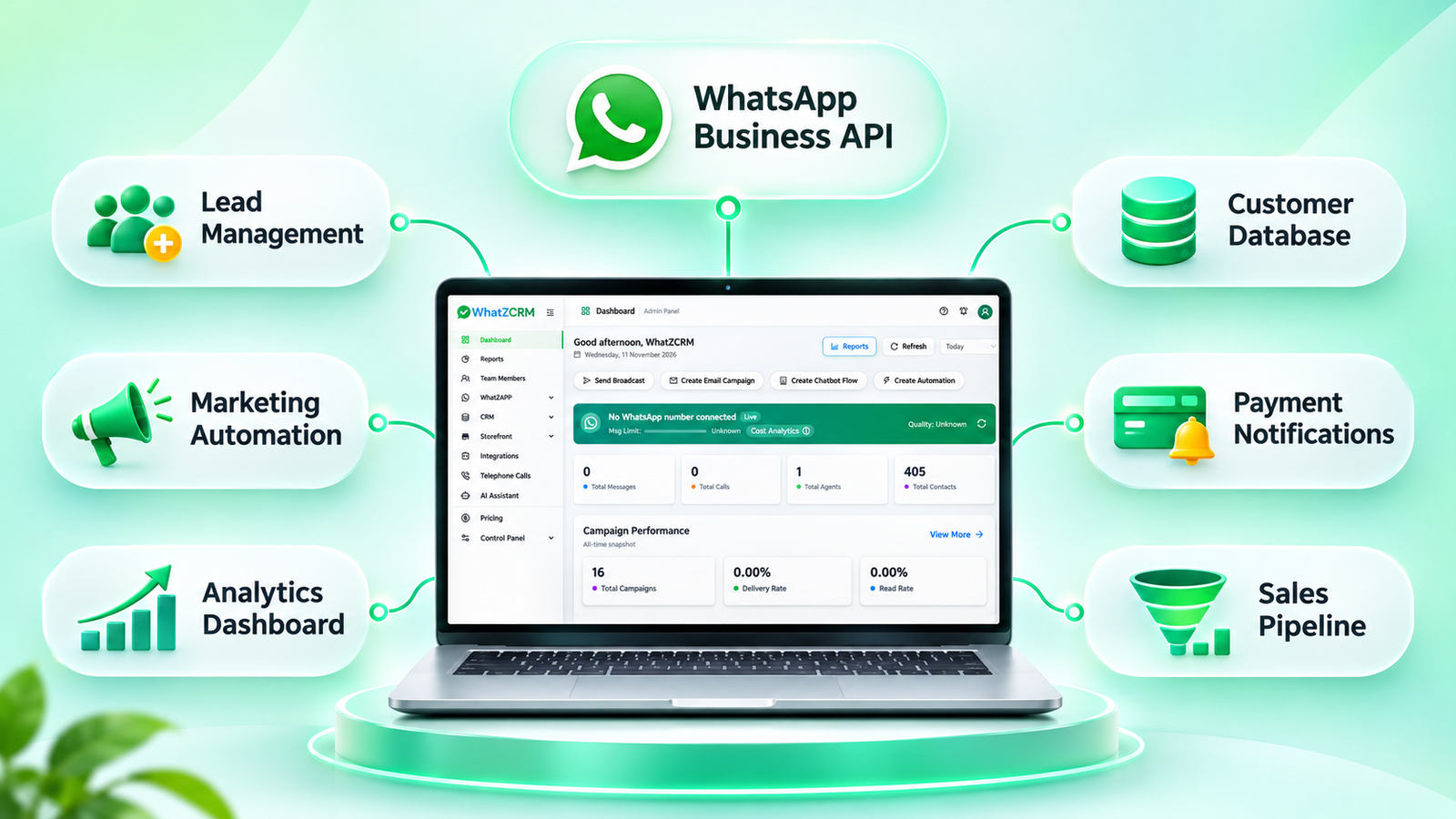
WhatZCRM brings WhatsApp communication and CRM activities together in one platform.
It helps businesses manage customer conversations while keeping their sales and follow-up activities organised.
Here are some ways WhatZCRM supports business operations:
Unified Team Inbox
Manage customer conversations from a centralised inbox. Teams can coordinate responses, handle enquiries, and maintain better visibility into customer interactions.
AI-Powered Chatbot Automation
Use chatbot automation to respond to common questions, collect customer information, and guide prospects through initial conversations.
Lead and Sales Pipeline Management
Capture leads, organise customer details, track deals, and manage sales activities from one platform.
Automated WhatsApp Campaigns
Plan and manage WhatsApp campaigns for promotions, announcements, reminders, and customer engagement.
Smart Follow-ups and Workflows
Automate repetitive communication and follow-up activities to help your team manage customer relationships more efficiently.
Customer Communication on Mobile
Access conversations, customer history, leads, deals, tasks, and follow-up activities through a mobile-friendly CRM.
Explore WhatZCRM’s WhatsApp Automation, WhatsApp Marketing, and WhatsApp Campaign Automation solutions to understand how these features can support your business.
Best Practices for Using WhatsApp Business API in SaaS
To get better results from WhatsApp Business API, SaaS companies should follow a structured communication strategy.
Get customer consent: Send business-initiated messages only after customers provide the required opt-in.
Use approved message templates: Follow WhatsApp’s template requirements for business-initiated messages outside the customer service window.
Understand the 24-hour customer service window: Businesses can respond with non-template messages within 24 hours of a customer’s latest message. Outside this window, approved templates are generally required to initiate business conversations.
Personalise communication: Make messages relevant to the customer’s interests, activity, or requirements.
Automate repetitive tasks: Use automation for welcome messages, reminders, notifications, and initial enquiries.
Maintain human support: Allow customers to connect with a support representative when automated responses are not sufficient.
Monitor performance: Regularly review delivery, engagement, response, and conversion metrics.
Follow WhatsApp policies: Ensure that messaging practices comply with the latest WhatsApp Business Platform policies and applicable data protection requirements.
For additional ideas, explore our guide on WhatsApp marketing strategies for businesses.
Conclusion
Scaling a SaaS business requires more than acquiring new customers. It involves building strong customer relationships, improving communication, managing leads efficiently, and delivering consistent support.
The WhatsApp Business API for SaaS provides businesses with a scalable way to manage customer conversations, automate communication, and connect messaging with their existing business workflows.
With a WhatsApp CRM solution like WhatZCRM, businesses can bring conversations, lead management, sales activities, and automation together in one platform.
Ready to simplify your business communication?
Explore WhatZCRM and discover how WhatsApp CRM and automation can help your business manage conversations more effectively.