
With over 3.3 billion monthly active users in 2026, WhatsApp has become the primary customer communication channel across every industry. The businesses winning right now are responding instantly, automatically qualifying leads, and booking appointments while they sleep through a WhatsApp chatbot.
A WhatsApp chatbot can be built without coding with a no-code automation platform that integrates with the WhatsApp Business API. These platforms provide visual drag-and-drop builders that enable businesses to design automated conversational flows for lead generation, customer support, appointment booking, and marketing automation.
In most cases, a WhatsApp chatbot can be built and deployed in 30–60 minutes using pre-built templates and visual workflow tools.
This guide explains how to build a WhatsApp chatbot without coding, using modern no-code tools that connect directly to the WhatsApp Business API.
What Is a WhatsApp Chatbot?
A WhatsApp chatbot is an automated program connected to your WhatsApp Business number through the official WhatsApp Business API. When a customer messages your business, the chatbot receives it and responds automatically based on the flow logic you design, with no human intervention.
Unlike simple auto-replies, a well-built WhatsApp chatbot can collect customer information, qualify and score leads, route conversations to the right team, book appointments, send files and product images, handle FAQ queries, and trigger backend workflows all within a single WhatsApp conversation.
| Chatbot Type | How It Works | Best For |
| Rule-Based | Responds to button presses, menus, and fixed keywords | Lead forms, bookings, and FAQ menus |
| AI-Powered | Uses NLP to understand open-ended, conversational messages | Complex queries, sales conversations |
| Hybrid (Recommended) | Combines structured flows with AI fallback responses | Most business use cases in 2026 |
Many modern chatbot platforms support all three types. For example, platforms like WhatZCRM allow businesses to start with rule-based flows and later add AI-powered responses.
Why No-Code WhatsApp Chatbots Are Exploding in 2026
No-code platforms have fundamentally changed who can build automation. Three years ago, deploying a WhatsApp chatbot required API developers, backend infrastructure, webhook management, and weeks of testing. Today, the same result takes 30 to 60 minutes.
Here is why adoption has accelerated so sharply:
- Speed to launch: Deploy a functional chatbot using pre-built templates without any setup complexity
- Zero developer dependency: Your marketing or ops team owns it entirely, no engineering resources required
- Visual drag-and-drop interface: Design conversation flows by connecting blocks, no code syntax needed
- Built-in CRM and automation: No third-party integrations to manage, everything runs in one dashboard
- Easy iteration: Update flows, A/B test messages, and optimize performance in real time
- Industry templates: Ready-made flows for real estate, healthcare, e-commerce, and education speed up launch further
Proven Business Benefits of a WhatsApp Chatbot for any Business
The case for WhatsApp chatbots is data-driven. Here are the outcomes businesses are documenting across industries:
| Benefit | Documented Impact |
| Lead generation | Up to 5x more leads compared to traditional channels |
| Conversion rate | 2–3x higher than website contact forms |
| Response speed | 225% improvement in first response time |
| Support cost | 30–50% reduction within the first 6 months of deployment |
| Sales growth | 27% average increase for WhatsApp-enabled businesses |
| Cart recovery (e-commerce) | 15–25% recovery rate vs 3–5% via email |
| Customer satisfaction | 67% of users trust WhatsApp chatbot responses for support |
According to research from Meta and multiple marketing automation studies, businesses that use WhatsApp automation often experience significantly higher engagement than with traditional communication channels.
Requirements to Build a WhatsApp Chatbot
The prerequisites are minimal and can be completed within a single business day. Here is your pre-launch checklist:
- WhatsApp Business API access: Required to connect your number to any chatbot platform. This is different from the standard WhatsApp Business app. WhatZCRM manages the API onboarding process for you.
- A verified business WhatsApp number: Your number must be verified through Meta’s Business Manager. WhatZCRM’s setup wizard guides you through this step.
- A no-code chatbot platform: Choose a platform with a visual builder, CRM integration, and WhatsApp-compliant templates. WhatZCRM provides all of this in one place.
- Your conversation flow plan: Sketch your welcome message, main user pathways (lead capture, FAQ, booking), and the handoff to a human agent.
- Approved WhatsApp message templates: Required for messages sent outside the 24-hour session window. WhatZCRM provides pre-approved, industry-specific templates.
Step-by-Step Guide to Build a WhatsApp Chatbot Without Coding
Follow these steps to go from zero to a live, automated WhatsApp chatbot. This is the exact process that WhatZCRM users follow to deploy their bots in under an hour.
Step 1: Choose the Right No-Code WhatsApp Chatbot Builder
The platform you choose determines how powerful, flexible, and maintainable your chatbot will be in the long term. Not all builders are equal. Evaluate platforms against these requirements:
| Required Feature | Why It Matters | WhatZCRM |
| Drag-and-drop visual builder | Build flows without code, essential for non-tech teams | Yes |
| Pre-built industry templates | Reduce setup from hours to minutes | Yes, multiple industries |
| AI reply capability | Handle open-ended questions beyond fixed menus | Yes |
| Built-in CRM | Store and manage leads without third-party tools | Yes (native) |
| Multi-agent inbox | Route conversations to the right team member | Yes |
| Real-time analytics | Track performance and optimize flows | Yes |
| WhatsApp API compliance | Ensure messaging follows Meta’s policies | Yes (fully managed) |
| Human escalation | Seamless handoff to live agents with full context | Yes |
WhatZCRM is one of the few platforms that combines a no-code chatbot builder, CRM, pipeline management, AI replies, and a multi-agent inbox in a single product, making it particularly well-suited for SMBs that want an all-in-one solution without managing multiple tools. Start a free trial at WhatZCRM.
Step 2: Connect Your WhatsApp Business API
Before designing any flow, your WhatsApp number needs to be connected to the API. WhatZCRM simplifies this entire process through an onboarding wizard:
- Create or verify your Facebook Business Manager account
- Submit your business details and complete Meta’s business verification process
- Connect your verified WhatsApp number through the WhatZCRM dashboard
- Await Meta’s approval typically completed within a few hours
Once connected, every inbound WhatsApp message to your business number will automatically trigger your chatbot flows. You are now ready to build.
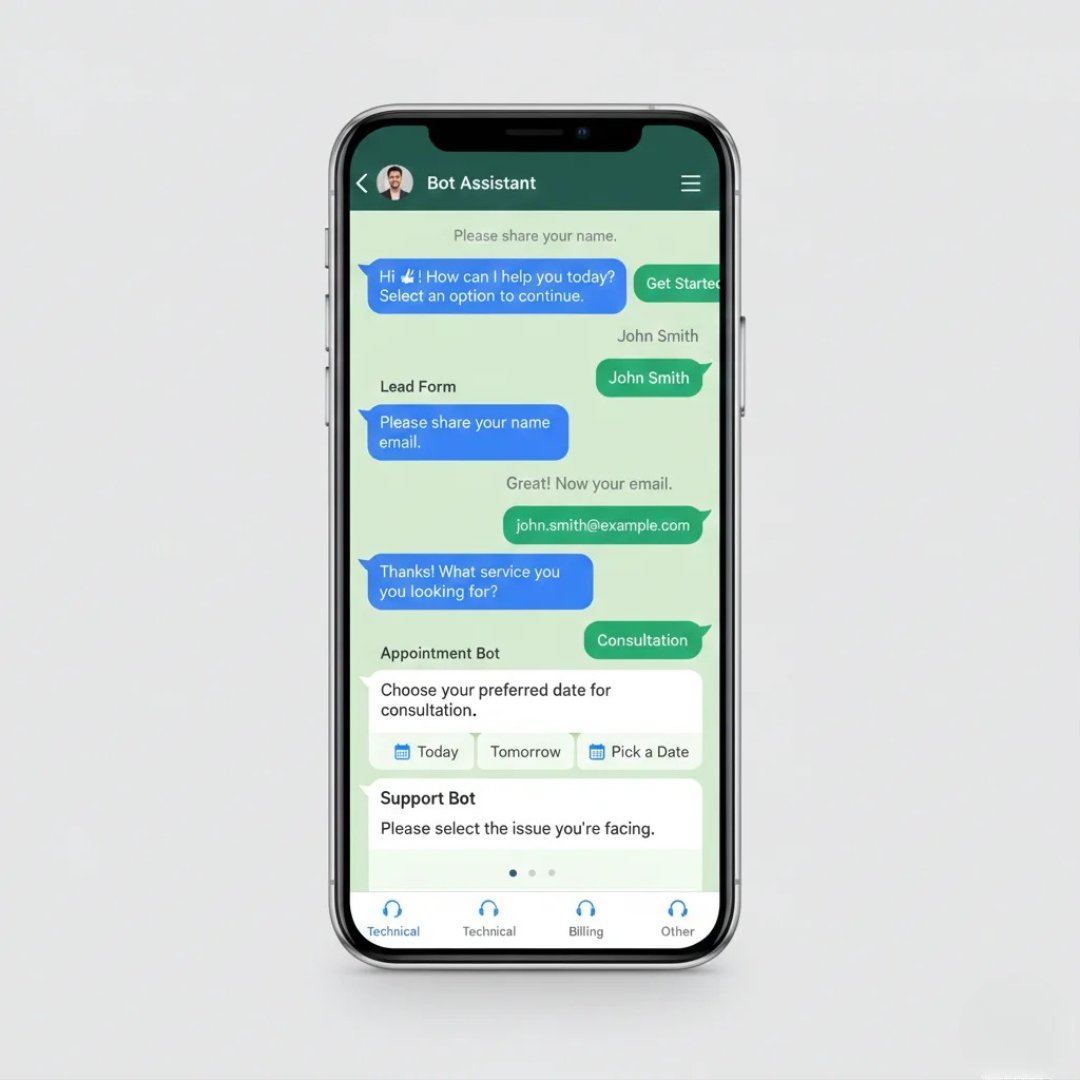
Step 3: Design Your Chatbot Flow Using the Visual Builder
This is the core of the process. WhatZCRM drag-and-drop editor uses visual blocks that you connect to define your conversation logic. No code, just flow design.
Core elements every effective chatbot flow should include:
- Welcome message: Your first impression. Keep it warm, clear, and offer immediate next steps
- Interactive menu buttons: Give users 3–4 clear options (e.g., Get a Quote / Book a Demo / Talk to Support)
- Lead capture sequence: Collect name, email, phone, and intent progressively through conversational questions
- FAQ answer blocks: Automate your top 5–10 most common questions so agents never repeat themselves
- Conditional logic: Show different responses based on user input, CRM data, or lead score
- Media and documents: Share product images, PDFs, brochures, and price lists within the chat
- Human handover: Always include a ‘Talk to a real person’ option, never trap users in automated loops
📋 Message Examples
Welcome:
“Hi! Welcome to [Business Name]. How can we help you today?”
[Get a Quote] [Book a Demo] [Talk to Support] [Learn More]
Lead Capture:
“Great! Can I start with your name?”
“Thanks, [Name]! What service are you most interested in?”
“Perfect. Our team will reach out within 2 hours. Anything else?”
FAQ Example:
User types “price” → Bot: “Here’s our current pricing guide: [PDF link]”
“Would you like a custom quote?” [Yes, let’s talk] [Not right now]
Appointment:
“Choose your preferred day for a consultation.”
[Today] [Tomorrow] [This Week] [Next Week]
Step 4: Add Automation Rules and Smart Triggers
This step transforms your chatbot from a basic responder into a revenue-driving system. WhatZCRM’s automation layer runs silently in the background, managing lead flows without human involvement:
- Keyword triggers: Auto-respond when users type specific words like ‘price’, ‘demo’, ‘urgent’, or ‘support.’
- Lead routing: Automatically assign inbound conversations to the right sales rep or department based on intent
- Follow-up drip sequences: Send timed follow-up messages for leads who started a flow but did not complete it
- Conversation tagging: Tag leads automatically by interest, product category, or funnel stage
- CRM status updates: Automatically move a lead to the next pipeline stage when they complete a chatbot step
- Appointment reminders: Send automated WhatsApp reminders 24 hours and 1 hour before scheduled appointments
Step 5: Connect Your CRM and Business Integrations
Your chatbot becomes exponentially more valuable when it feeds data directly into your business systems. WhatZCRM handles this natively, no third-party connectors required:
- Sync every lead captured by the chatbot directly into WhatZCRM’s built-in CRM
- Export qualified leads to Google Sheets for reporting and team visibility
- Connect website contact forms and landing pages to trigger WhatsApp bot conversations
- Trigger outbound WhatsApp messages from CRM events (e.g., when a deal moves pipeline stages)
- Personalize all chatbot messages using CRM variables: name, product interest, location, and lead score
Step 6: Test Every Flow Before Going Live
Never skip testing. WhatZCRM provides a sandbox environment to simulate real conversations before deployment. Run through these checks:
- Test every button and menu option to confirm it routes to the correct next step
- Verify that lead data is captured accurately and appears correctly in the CRM
- Check that the human handover works; agents should receive the full conversation history
- Test with unexpected inputs what happens when a user sends something off-script?
- Confirm fallback messages are active for unrecognized inputs
- Preview the bot on a real mobile device to check message formatting and media display
Step 7: Deploy and Promote Your Live WhatsApp Bot
Once you are satisfied with testing, publish your chatbot through WhatZCRM. To maximize traffic to your bot after launch:
- Add a Click-to-WhatsApp button on your website homepage and all landing pages
- Include a WhatsApp QR code on print materials, banners, trade show displays, and business cards
- Add the WhatsApp chat widget to your website footer
- Run Click-to-WhatsApp ads on Facebook and Instagram; these drive users directly into your bot flow
- Add your WhatsApp link to email signatures, LinkedIn bio, and Google Business profile
- Include WhatsApp contact prompts in all outbound email campaigns
How WhatZCRM Simplifies WhatsApp Chatbot Automation
WhatZCRM provides a complete ecosystem for businesses that want to automate WhatsApp communication.
The platform offers a visual drag-and-drop chatbot builder that lets users quickly create automated conversation flows. Businesses can design workflows for lead collection, customer support, appointment booking, and marketing campaigns.
In addition to chatbot automation, WhatZCRM includes a built-in CRM system that organizes customer data and tracks interactions. The platform also supports AI-powered responses, keyword triggers, and multi-agent inbox management.
By combining chatbot automation with CRM and workflow management, WhatZCRM allows businesses to manage customer communication more efficiently without relying on multiple tools.
Also Read: Detailed Overview of Top 5 WhatsApp Automation Tools: Features, Benefits & Comparison
Final Thoughts
WhatsApp chatbots are transforming how businesses communicate with customers. By automating responses, collecting leads, and managing conversations efficiently, chatbots help companies improve customer experience while reducing manual workload.
Thanks to modern no-code tools, building a WhatsApp chatbot is no longer limited to developers. Businesses can create automation workflows using simple drag-and-drop interfaces and deploy them within minutes.
Platforms such as WhatZCRM make it easy to build WhatsApp chatbots, manage leads, and automate communication from a single dashboard. As customer expectations continue to grow, implementing chatbot automation can provide a significant competitive advantage.