
WhatsApp automation has become a must-have communication channel for businesses of every size. Whether you’re a SaaS brand, e-commerce store, service provider, or event organiser, the ability to send pre-approved, automated messages helps you stay connected, personalise experiences, and get faster responses from users.
In this comprehensive guide, you’ll find 15 copy-ready WhatsApp template messages you can use today to automate your key workflows from onboarding and order updates to reminders, promotions, and more. These templates follow the best practices of the WhatsApp Business API and can be triggered via workflows, automation platforms, or API campaigns.
What Do We Know About WhatsApp Templates & Why You Need Them
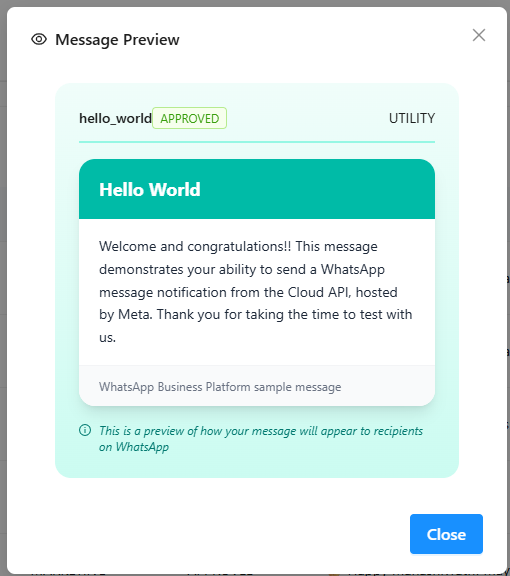
WhatsApp imposes a 24-hour messaging window: businesses can freely message users only if the user has messaged first within 24 hours. If that window expires, the only way to message users is through Meta-approved template messages, which are structured and include dynamic variables such as customer names or order IDs.
These templates are essential for:
- Transactional updates (like order confirmations)
- Reminders (appointments, payments)
- Marketing or promotional campaigns
- Support follow-ups
They ensure your automation stays compliant, personal, and engaging, not spammy.
Also Read: How WhatsApp Business Greeting Message Works
Key Benefits of Ready-to-Use Templates
- Faster Onboarding & Activation: Welcome and onboarding templates guide users instantly after signup, increasing activation rates.
- Consistent Messaging Across Funnels: Templates ensure your brand voice remains consistent across marketing, sales, and support.
- Higher Open & Click Rates: WhatsApp open rates can reach 80–95%, significantly higher than email marketing.
- Reduced Errors & Compliance Risks: Pre-approved templates reduce human error and ensure compliance.
15+ Ready-to-Use WhatsApp Templates for Automation (With Use-Case Explanation)
1. Welcome & Onboarding Template
The welcome template is the first automated message a user receives after signing up or opting in. This message sets the tone for your brand communication and reassures users that their action was successful.
A strong onboarding message improves trust and encourages engagement right from the start.
Template Message
Hi {{1}} 👋
Welcome to {{2}}!
We’re excited to have you onboard. You’ll now receive important updates, helpful tips, and exclusive offers right here.
If you need assistance anytime, just reply HELP.
2. OTP / Verification Template
Authentication templates are used to securely send one-time passwords or verification codes. These are critical for account security and user verification during login or registration.
Template Message
Hello {{1}},
Your verification code for {{2}} is {{3}}.
This code is valid for the next 10 minutes.
Please do not share it with anyone for security reasons.
3. Order Confirmation Template
After a purchase, customers expect immediate confirmation. This template reassures them that their payment was successful and their order is being processed.
Template Message
Hi {{1}} 🎉
Thank you for shopping with us!
Your order #{{2}} has been successfully placed.
We’re preparing it and will notify you once it’s shipped.
4. Shipping Update Template
Shipping updates keep customers informed about delivery progress. Transparent communication reduces support queries and builds confidence.
Template Message
Hello {{1}} 🚚
Great news! Your order #{{2}} has been shipped.
Track your delivery status here: {{3}}
We’ll keep you updated until it reaches you.
5. Abandoned Cart Reminder Template
Cart abandonment is common in eCommerce. Automated reminders help recover potential lost sales by nudging customers to complete their purchase.
Template Message
Hi {{1}},
You left something behind in your cart 🛒
Complete your purchase here: {{2}}
Use code SAVE10 for an extra discount before it expires!
6. Payment Reminder Template
Payment reminders help subscription-based or service businesses collect payments without manual follow-ups.
Template Message
Hi {{1}},
This is a friendly reminder that your payment of ₹{{2}} is due on {{3}}.
You can complete your payment securely here: {{4}}
Thank you for your continued support!
7. Subscription Renewal Template
Subscription renewal reminders ensure customers don’t lose access due to expiration.
Template Message
Hello {{1}} 🔁
Your subscription for {{2}} will expire on {{3}}.
Renew now to continue enjoying uninterrupted access: {{4}}
8. Appointment Reminder Template
Appointment reminders are essential for service providers, clinics, consultants, and agencies. Automated reminders reduce missed appointments.
Template Message
Hi {{1}},
This is a reminder of your appointment with {{2}} on {{3}} at {{4}}.
If you need to reschedule, please reply here.
9. Support Ticket Confirmation Template
When users raise a support request, acknowledging it instantly improves customer confidence.
Template Message
Hi {{1}},
We’ve received your request.
Your support ticket ID is {{2}}.
Our team will get back to you shortly.
10. Feedback & Review Request Template
Customer feedback helps improve services and build credibility. This template is ideal after product delivery or service completion.
Template Message
Hi {{1}} ⭐
We hope you’re enjoying your recent experience with us!
We’d love your feedback.
Share your review here: {{2}}
11. Refund Status Update Template
Refund transparency helps maintain trust during return or cancellation processes.
Template Message
Hi {{1}},
Your refund of ₹{{2}} for order #{{3}} has been successfully processed.
The amount should reflect in your account within 3–5 business days.
12. Promotional Campaign Template
Promotional templates are designed to announce limited-time offers, seasonal sales, or new launches. They should feel exciting, not spammy.
Template Message
🎉 Hi {{1}}!
Our exclusive offer is now LIVE!
Enjoy up to 50% OFF on selected products.
Shop now before it ends: {{2}}
13. Cross-Sell / Upsell Template
This template suggests related products or upgrades based on user activity, increasing average order value.
Template Message
Hi {{1}},
Since you purchased {{2}}, we thought you might also love {{3}}.
Check it out here: {{4}}
14. Webinar / Event Reminder Template
Event reminders increase attendance and engagement for webinars, workshops, and live sessions.
Template Message
Hi {{1}} 👋
Your event {{2}} starts soon!
Join us here: {{3}}
We can’t wait to see you there!
15. Back-in-Stock Alert Template
Back-in-stock alerts create urgency and excitement among users waiting for a product.
Template Message
Hi {{1}},
Great news! {{2}} is back in stock 🎉
Grab yours now before it sells out again: {{3}}
How to Make WhatsApp Templates More Engaging
Most businesses make one common mistake with WhatsApp automation. They treat templates like email broadcasts.
But WhatsApp is not email. It’s personal. It’s conversational. It’s immediate.
If you want higher replies, clicks, and conversions, your templates must feel human, not automated.
Here’s how to make your WhatsApp templates significantly more engaging 👇
Here are proven tactics:
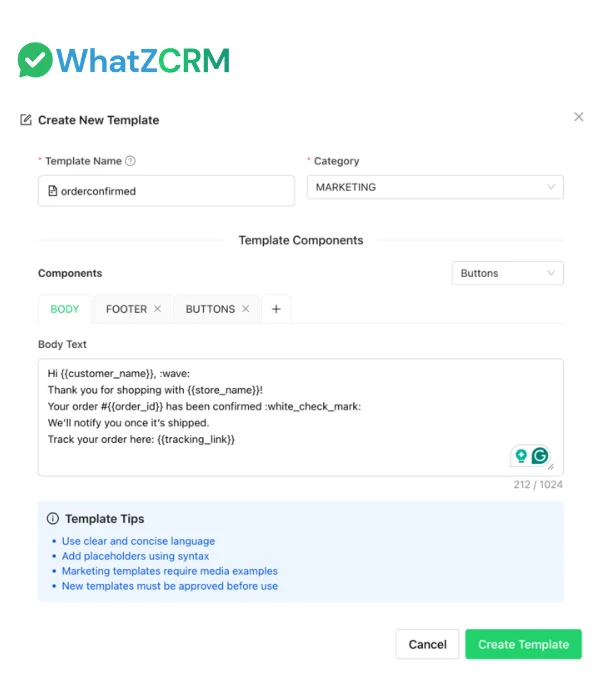
- Use Personalisation Variables: Messages with names and contextual data perform significantly better.
- Keep Messages Short: WhatsApp is a conversational platform. Avoid long paragraphs.
- Add Clear CTAs: Use action-driven language like:
• Pay Now
• Track Order
• Renew Today
• Join Webinar - Use Emojis Strategically: Emojis increase visibility and response rates when used moderately.
- Follow Meta Guidelines: Avoid spammy language, excessive caps, or misleading claims to prevent rejection.
Interactive & Button-Driven Templates
WhatsApp allows:
- Quick Reply Buttons
- Call-to-Action Buttons
Button text limit: 20 characters
WhatsApp Template Messages Approval Tips (WhatsApp API)
Common Reasons for Rejection
- Spammy marketing language
- Asking for sensitive data
- Excessive capitalization
- Misleading claims
- Incorrect variable formatting
Meta-Friendly Writing Tips
- Keep tone professional
- Avoid aggressive urgency
- Place variables correctly
- Don’t include random links
Final Thoughts
Templates are powerful tools that transform WhatsApp into a personalised, automated, scalable communication channel. Whether you’re running customer service workflows, sending high-impact reminders, or promoting seasonal offers, these ready-to-use templates give you a strong foundation.
Automating your WhatsApp messaging not only boosts efficiency but also strengthens customer trust, as users receive timely, relevant updates without waiting for manual replies.
Want more templates or ready-to-use script packs? Let me know, and I can generate them for you!