

WhatsApp has become an important communication channel for businesses to connect with customers, answer questions, share product information, and manage sales inquiries. However, responding to the same customer questions repeatedly can consume valuable time, especially for businesses receiving multiple WhatsApp messages every day.
This is where WhatsApp Business Quick Replies become useful.
Quick Replies are pre-written messages that businesses can save in the WhatsApp Business app and reuse whenever customers ask common questions. Instead of manually typing the same response every time, businesses can enter a shortcut to retrieve a saved message and send it with just a few taps.
For example, imagine you run an online clothing store. Customers frequently ask about product prices, delivery charges, payment methods, and return policies. You can create saved responses for these questions using shortcuts such as /price, /delivery, /payment, and /return.
This helps businesses reduce repetitive typing, maintain consistent communication, and respond to customer inquiries more efficiently.
The WhatsApp Business app supports up to 50 saved Quick Replies. Depending on the device and app version, supported media can also be included in saved replies.
How Do WhatsApp Business Quick Replies Work?
WhatsApp Business Quick Replies work through saved messages and keyboard shortcuts.
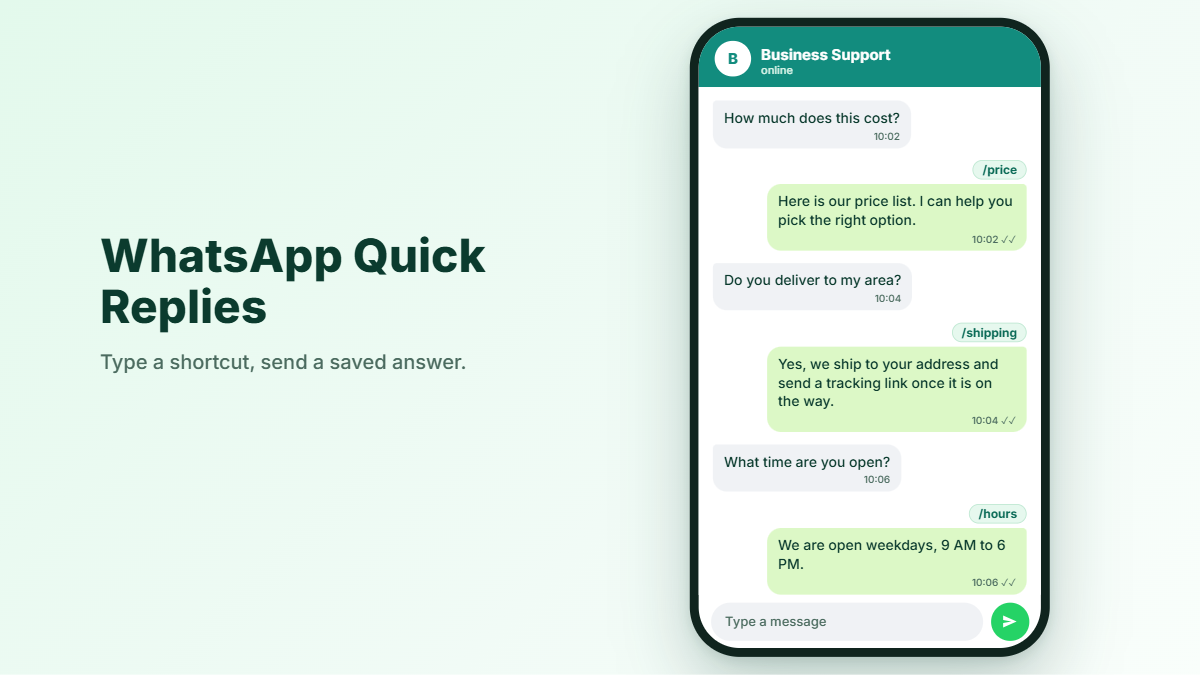
Businesses first create frequently used responses and assign a unique shortcut to each message. When responding to a customer, they can type a forward slash (/) in the chat box to access their saved replies.
The selected message appears in the text field, where the business can review, edit, and send it.
Example:
Customer: “Hi, what are your business hours?”
Business enters: /hours
Saved Quick Reply: “Our business hours are Monday to Saturday, 9:00 AM to 6:00 PM. Feel free to contact us during these hours. We’re happy to help!”
How the process works
- Create a frequently used customer response.
- Assign a shortcut to that message.
- Open the relevant customer conversation.
- Type / followed by the shortcut or select it from the suggestions.
- Review the message and personalize it if required.
- Send the response to the customer.
Quick Replies do not automatically send messages when a customer contacts your business. A person selects and sends the saved response.
WhatsApp Quick Replies vs Automated Messages: What’s the Difference?
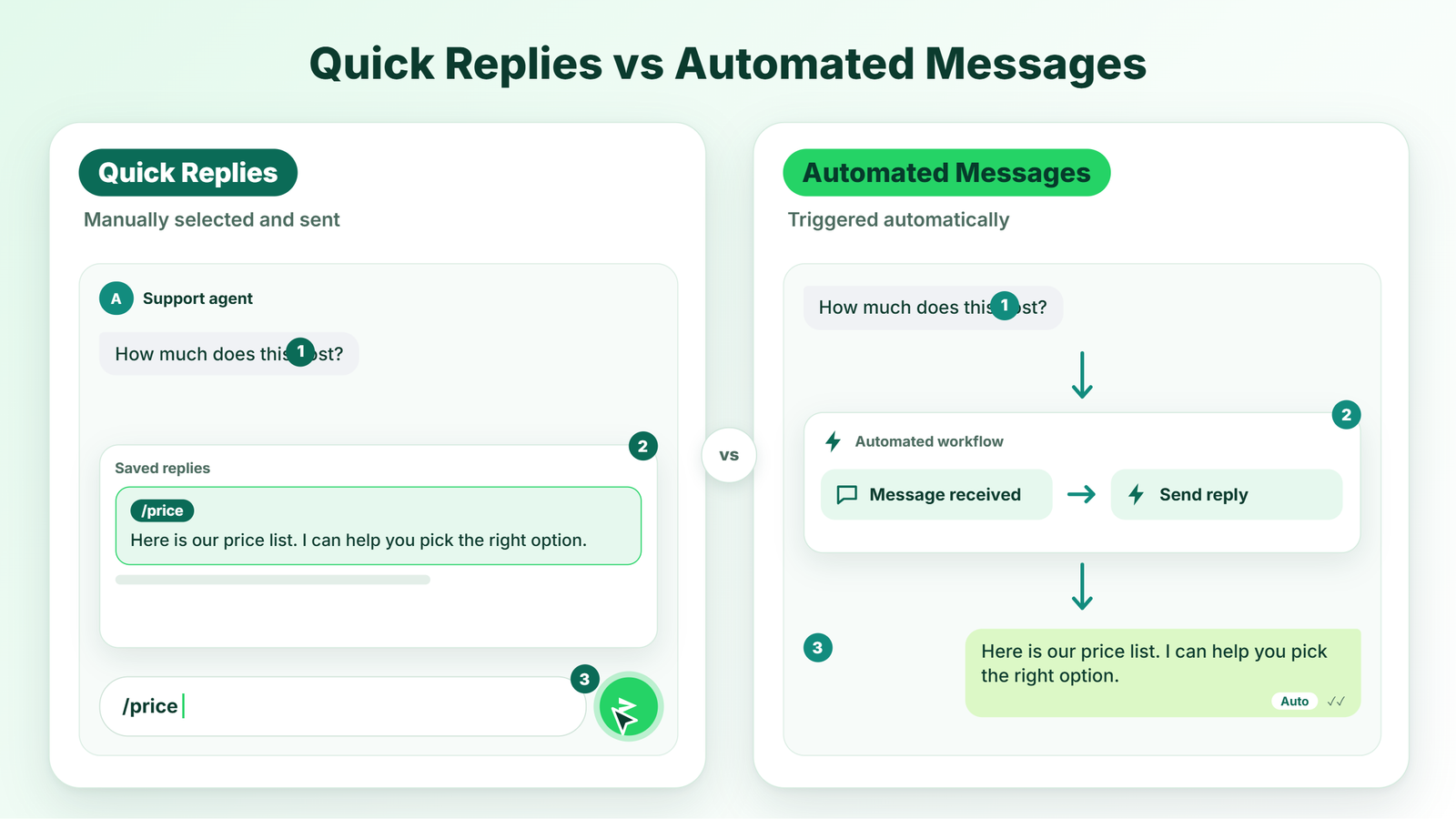
Many businesses confuse Quick Replies with automated WhatsApp messages. Although both features help businesses respond faster, they work differently.
| Feature | Quick Replies | Automated Messages |
| How they work | Saved messages selected manually | Messages triggered automatically |
| Human involvement | Required to select and send | Not always required |
| Trigger | Agent enters a shortcut | Customer action or predefined condition |
| Personalization | Manually editable before sending | Can use configured variables and workflows |
| Best for | Repeated questions and standard responses | Welcome messages, away messages, reminders |
| Example | /price | Automatic welcome message |
For example, when a customer asks about your product pricing, your sales representative can use a saved Quick Reply to share the pricing details.
However, if a customer sends a message outside business hours, an automated away message can inform them when the team will be available again.
In simple terms: Quick Replies help your team send frequently used messages faster, while automation helps your business respond based on predefined triggers and workflows.
Also Read: WhatsApp vs WhatsApp Business: Features, Benefits & Comparison
Types of Quick Replies Businesses Can Create
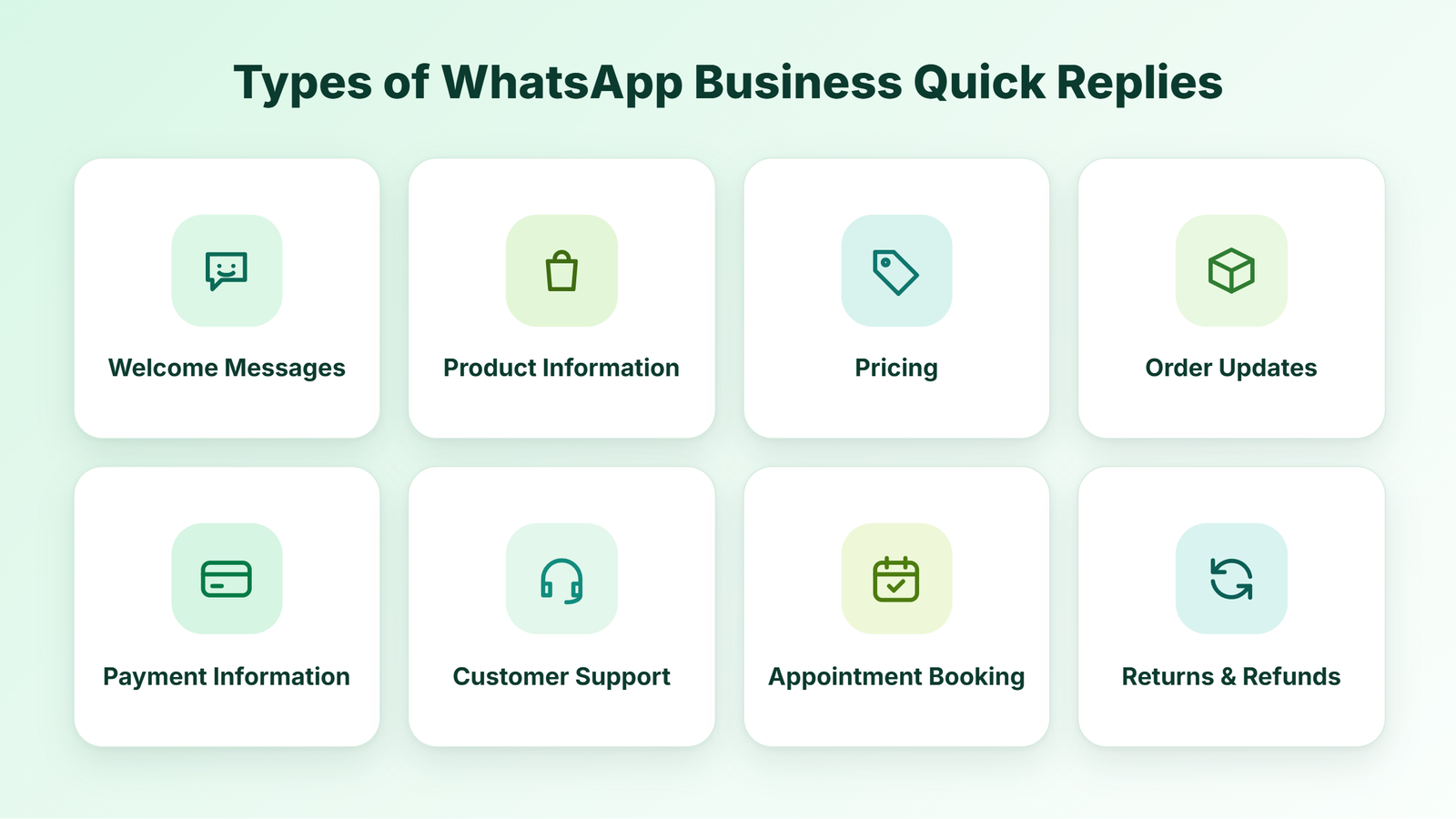
Businesses can create different Quick Replies depending on the questions they receive and the type of customer support they provide. Here are some common categories:
- Welcome messages: Greet customers when they start a conversation.
- Product information: Share product specifications, features, and availability.
- Pricing responses: Answer frequently asked questions about prices and packages.
- Order updates: Share order confirmations and shipping information.
- Payment information: Provide payment methods and account details.
- Business information: Share operating hours, business addresses, and contact details.
- Customer support: Respond to common complaints and support requests.
- Appointment bookings: Share booking instructions and available timings.
- Returns and refunds: Explain return policies and refund procedures.
- Follow-up messages: Check whether customers need additional information.
Having these responses saved helps businesses handle repetitive inquiries without composing every message from scratch.
20 Quick Reply Message Examples for WhatsApp Business
Creating useful Quick Replies starts with understanding the questions your customers ask most frequently. Below are 20 ready-to-use WhatsApp Business Quick Reply messages for different business situations. You can copy these messages, replace the placeholders with your business information, and save them using the suggested shortcuts.
1. Welcome Message
Quick Reply Shortcut: /welcome
“Hello! Thank you for contacting [Business Name]. We’re happy to assist you. Please let us know what you’re looking for, and our team will be glad to help.”
Best for: Retail stores, service providers, online businesses, and customer support teams.
2. Business Hours Reply
Quick Reply Shortcut: /hours
“Thank you for reaching out! Our business hours are Monday to Saturday, 9:00 AM to 6:00 PM. We’re available during these hours to assist you.”
Best for: Restaurants, clinics, retail stores, and local service businesses.
3. Product Inquiry Reply
Quick Reply Shortcut: /product
“Thank you for your interest in our products! Please let us know which product you’re looking for. We’ll share the details, features, and available options shortly.”
Best for: E-commerce stores, electronics shops, clothing brands, and retail businesses.
4. Pricing Inquiry Reply
Quick Reply Shortcut: /price
“Thank you for your interest! The price of [Product/Service Name] starts at [Price]. Please let us know if you’d like more details about the available packages.”
Best for: SaaS companies, agencies, consultants, and online stores.
5. Product Availability Reply
Quick Reply Shortcut: /available
“Good news! [Product Name] is currently available. Would you like us to share more details or help you place an order?”
Best for: Retail stores, fashion brands, and e-commerce businesses.
6. Order Confirmation Reply
Quick Reply Shortcut: /order
“Thank you for placing your order with [Business Name]! Your order #[Order ID] has been successfully confirmed. We’ll keep you updated on the next steps.”
Best for: Online stores, restaurants, and delivery businesses.
7. Payment Confirmation Reply
Quick Reply Shortcut: /payment
“Hello [Customer Name], we’ve received your payment of [Amount] for order #[Order ID]. Thank you for choosing [Business Name]!”
Best for: E-commerce stores, educational institutions, and service providers.
8. Shipping and Delivery Update
Quick Reply Shortcut: /shipping
“Your order #[Order ID] has been shipped successfully! You can track your package using this link: [Tracking Link]. Thank you for shopping with us.”
Best for: Online retailers, logistics companies, and product-based businesses.
9. Delayed Order Reply
Quick Reply Shortcut: /delay
“We sincerely apologize for the delay in your order. Our team is checking the delivery status and will share an update as soon as possible. Thank you for your patience.”
Best for: E-commerce businesses, courier services, and delivery companies.
10. Appointment Booking Reply
Quick Reply Shortcut: /booking
“Thank you for your interest in booking an appointment with us! Please share your preferred date and time. Our team will check availability and get back to you.”
Best for: Clinics, salons, consultants, and professional service providers.
11. Appointment Confirmation Reply
Quick Reply Shortcut: /confirm
“Your appointment with [Business Name] has been confirmed for [Date] at [Time]. We look forward to seeing you!”
Best for: Healthcare clinics, educational consultants, and service businesses.
12. Customer Support Reply
Quick Reply Shortcut: /support
“Thank you for contacting our support team. We’re here to help! Please explain the issue you’re experiencing and share any relevant details so we can assist you.”
Best for: SaaS companies, online businesses, and customer service teams.
13. Frequently Asked Questions Reply
Quick Reply Shortcut: /faq
“Looking for more information about our products or services? Visit our FAQ page here: [FAQ Link]. You’ll find answers to our most frequently asked questions.”
Best for: SaaS companies, educational platforms, and service providers.
14. Discount and Special Offer Reply
Quick Reply Shortcut: /offer
“Great news! We’re currently offering a special discount on [Product/Service]. Enjoy [Discount Details] until [Expiry Date]. Contact us if you’d like to know more!”
Best for: E-commerce stores, retail brands, and marketing businesses.
15. Refund and Return Policy Reply
Quick Reply Shortcut: /refund
“We understand your concern. You can review our return and refund policy here: [Policy Link]. Please share your order ID if you need assistance with your request.”
Best for: Online retailers, fashion brands, and e-commerce businesses.
16. Customer Feedback Request
Quick Reply Shortcut: /feedback
“Thank you for choosing [Business Name]! We’d love to hear about your experience. Please share your feedback here: [Feedback Link]. Your opinion helps us improve our services.”
Best for: Restaurants, hotels, service providers, and online stores.
17. Thank You Message
Quick Reply Shortcut: /thanks
“Thank you for contacting [Business Name]! We truly appreciate your interest and support. Please feel free to reach out whenever you need assistance.”
Best for: All types of businesses.
18. Out-of-Stock Product Reply
Quick Reply Shortcut: /stock
“We’re sorry! [Product Name] is currently out of stock. We expect it to be available by [Expected Date]. Would you like us to notify you when it’s back?”
Best for: Retail stores, online shopping platforms, and wholesalers.
19. Customer Follow-Up Message
Quick Reply Shortcut: /followup
“Hi [Customer Name], just checking if you’ve had a chance to review the details we shared earlier. Please let us know if you have any questions. We’re happy to help!”
Best for: Sales teams, real estate agencies, consultants, and service providers.
20. Closing Conversation Message
Quick Reply Shortcut: /close
“Thank you for chatting with us! We’re glad we could assist you today. If you need any further help, feel free to message us anytime. Have a wonderful day!”
Best for: Customer support teams, online stores, and service businesses.
Also Read: Top 15 Ready-to-Use WhatsApp Templates for Automation
How to Create Quick Replies in WhatsApp Business
Creating Quick Replies in WhatsApp Business is simple. You don’t need technical knowledge or additional software to get started. Follow these steps to create and save your frequently used messages.
Step 1: Open WhatsApp Business: Open the WhatsApp Business application on your smartphone.
Step 2: Navigate to Quick Replies: On Android, open the Tools tab and select Quick Replies. On iPhone, open Settings or Business Tools and find Quick Replies, depending on your app version.
Step 3: Add a New Quick Reply: Tap the Add (+) icon to create a new saved message.
Step 4: Enter Your Message: Write the response you frequently send to customers. For example: “Thank you for contacting us! Our team is available from Monday to Saturday, 9:00 AM to 6:00 PM.”
Step 5: Create a Shortcut: Assign a short and memorable shortcut to your message, such as /hours, /price, /delivery, or /payment.
Step 6: Save Your Quick Reply: Tap Save to store your message.
Step 7: Use Your Saved Quick Reply: Open any customer conversation and type / in the message box. Select your saved response, review it, make any necessary changes, and send it.
That’s it! You can now reuse your saved messages whenever similar customer questions arise. Menu names and placement may vary by device and app version.
What Are the Benefits of Using WhatsApp Business Quick Replies?
1. Save Time on Repetitive Messages
Businesses often receive the same questions about pricing, product availability, delivery charges, and business hours. Quick Replies allow employees to reuse saved messages instead of writing everything from scratch. This makes everyday customer communication more efficient.
2. Improve Customer Response Time
Customers expect businesses to respond to their questions without unnecessary delays. When frequently used responses are saved, employees can retrieve relevant information quickly and spend less time typing.
3. Maintain Consistent Communication
When multiple employees handle customer conversations, their responses may differ. Saved Quick Replies help businesses maintain consistent information about pricing, policies, services, and business operations. Employees should still personalize messages when a customer has a specific requirement.
4. Improve Customer Support Productivity
Customer support teams regularly answer repetitive questions. Reusable responses help employees spend less time composing routine messages and more time resolving complex customer issues.
5. Reduce Repetitive Typing
Instead of remembering and manually entering the same information, employees can use shortcuts to retrieve saved messages. This is particularly helpful for businesses that receive frequent WhatsApp inquiries throughout the day.
The Limitations of WhatsApp Business Quick Replies
1. Manual Message Selection
Quick Replies do not automatically respond to customer messages. Employees must select the appropriate saved response and send it manually. For businesses receiving hundreds of inquiries, handling every conversation this way can become time-consuming.
2. Limited Number of Saved Replies
The WhatsApp Business app supports up to 50 stored Quick Replies. This is sufficient for many small businesses, but growing teams may need more flexible response management.
3. No Automatic Customer Query Understanding
Quick Replies cannot independently understand a customer’s question and select the correct answer. An employee must identify the question and choose the relevant saved message.
4. Limited Team-Level Management
Saved replies in the WhatsApp Business app are designed around the app’s business-account experience. They do not provide the advanced centralized response management and team workflows that larger customer support operations may require.
5. No Built-in Automated Follow-Up Sequences
Sending a Quick Reply does not automatically schedule the next message or initiate a follow-up sequence. Businesses that want to automatically follow up with leads, send reminders, or nurture customers need additional automation capabilities.
These limitations become more important as a business expands its customer support and sales operations.
WhatsApp Quick Replies vs WhatsApp CRM: Which Is Better for Growing Businesses?
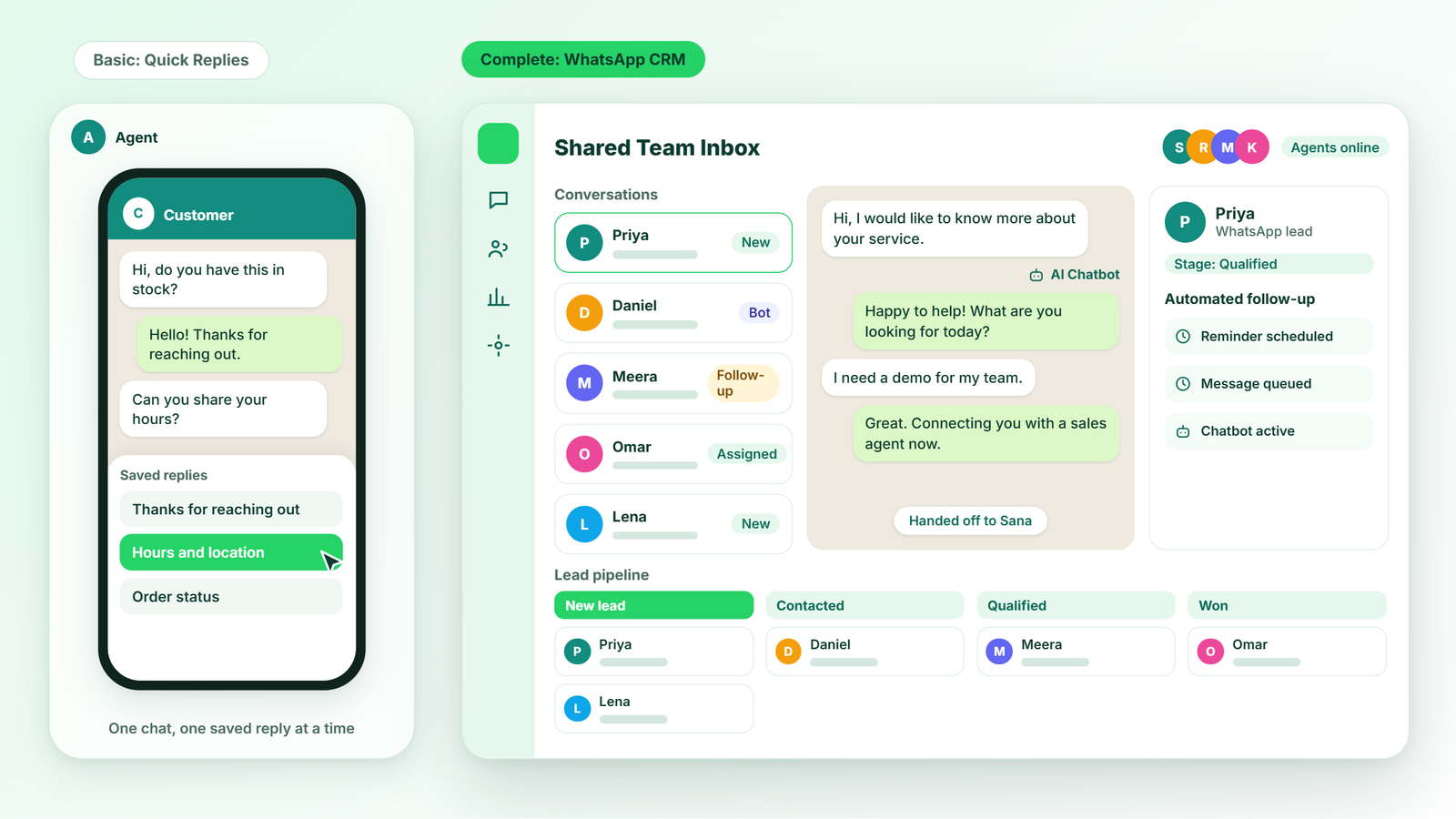
WhatsApp Business Quick Replies are a useful starting point for businesses that want to save frequently used messages. However, as customer conversations increase, businesses may need more than saved responses.
For example, an e-commerce business might receive inquiries about products, payments, shipping, refunds, and order status. A sales team may also need to manage new leads, assign conversations, track customer requirements, and follow up with prospects.
Managing all these activities manually through saved messages can become difficult. This is where a WhatsApp CRM platform becomes useful.
A WhatsApp CRM combines customer conversation management, lead management, team collaboration, and automation in one centralized system.
Manage WhatsApp Conversations Smarter with WhatZCRM
Bring customer conversations, AI chatbots, lead management, and WhatsApp automation together in one platform. Start your 7-day free trial.
Conclusion
WhatsApp Business Quick Replies are a simple but useful feature for businesses that regularly answer the same customer questions. By saving frequently used messages and assigning shortcuts, businesses can reduce repetitive typing, maintain consistent communication, and improve everyday customer support.
However, as customer inquiries and team requirements grow, manually managing every WhatsApp conversation may become challenging.
Businesses that need centralized communication, AI-powered chatbots, lead management, and automated follow-ups can consider a WhatsApp CRM platform like WhatZCRM.