

Setting up WhatsApp for business allows organizations to centralize customer communication, automate follow-ups, and improve sales and support efficiency. Using a WhatsApp CRM like WhatZCRM, businesses can manage multiple conversations, automate workflows, and convert chats into qualified leads, all from a single platform.
This guide provides a step-by-step setup on WhatsApp for business in 2026 to help businesses maximize engagement, streamline operations, and enhance customer satisfaction.
Why Businesses Are Turning to WhatsApp
WhatsApp has over 3 billion users worldwide, making it one of the most popular communication channels. Customers expect businesses to be reachable on the platform they use daily. Traditional tools like email, phone, or manual CRM systems often fail to meet these expectations due to slow response times, fragmented communication, and a lack of personalization.
Key challenges businesses face without WhatsApp automation include:
- Missed leads due to delayed responses
- Manual follow-ups consume valuable time.
- Poor customer engagement and satisfaction
- Disorganized communication across sales, support, and marketing teams
For decision-makers and business owners, the solution isn’t just using WhatsApp; it’s using WhatsApp Business with a powerful CRM like WhatZCRM to centralize communication, automate repetitive tasks, and convert chats into measurable business outcomes.
What Businesses Actually Need Today
Modern businesses need more than just a messaging app. The ideal solution should:
- Centralize all customer conversations in one platform
- Automate routine messages and follow-ups
- Track leads, sales pipelines, and team performance
- Provide analytics to measure success and optimize workflows.
- Provide multi-agent support for departments such as sales, support, and billing.
In short, businesses need a WhatsApp CRM that connects their messaging platform directly to their sales, support, and marketing teams, improving productivity while boosting customer experience.
Also Read: What Is a WhatsApp CRM, and Why Businesses Need It
What Is WhatZCRM?
WhatZCRM is an AI-powered WhatsApp CRM that helps businesses manage customer conversations, automate support, and convert WhatsApp chats into qualified leads. By integrating WhatsApp Business API, CRM features, and automation tools, WhatZCRM turns WhatsApp into a centralized business communication hub.
Core benefits of WhatZCRM include:
- Centralized Communication: Manage multiple WhatsApp numbers and agents in a single inbox.
- Automation: AI chatbots, workflow automation, auto-follow-ups, and broadcast campaigns.
- CRM Features: Lead management, segmentation, activity tracking, and reminders.
- Sales Tools: Sales pipelines, invoice and quotation generation, and task management.
- Analytics: Track performance, agent productivity, and engagement metrics.
WhatZCRM is ideal for small and medium businesses, startups, sales and support teams, agencies, and any organization that relies heavily on WhatsApp for customer communication.
Also Read: Learn How to Build a WhatsApp Chatbot without Code
Step-by-Step Guide to Setting Up WhatsApp for Business
Setting up WhatsApp for business with CRM integration may seem daunting, but breaking it down into steps makes it simple.
Step 1: Choose the Right WhatsApp Business Account
You can start with either:
- WhatsApp Business App: Suitable for small businesses managing a single number. Limited automation and CRM capabilities.
- WhatsApp Business API: Best for medium to large businesses or teams requiring multiple agents, automation, and CRM integration.
For businesses aiming to scale, integrating the WhatsApp Business API with WhatZCRM is the recommended approach.
Step 2: Verify Your Business
To use WhatsApp Business API:
- Register your business on Facebook Business Manager.
- Verify your business with official documents.
- Link your business number to the WhatsApp Business API account.
Verification ensures credibility and unlocks advanced messaging and automation features.
Step 3: Connect WhatsApp to WhatZCRM
After verification:
- Log in to your WhatZCRM dashboard.
- Navigate to WhatsApp Integration.
- Connect your verified WhatsApp Business number.
- Assign the number to relevant departments or agents (Sales, Support, Billing).
This centralizes all WhatsApp communication in one place, allowing multiple team members to manage messages without losing context.
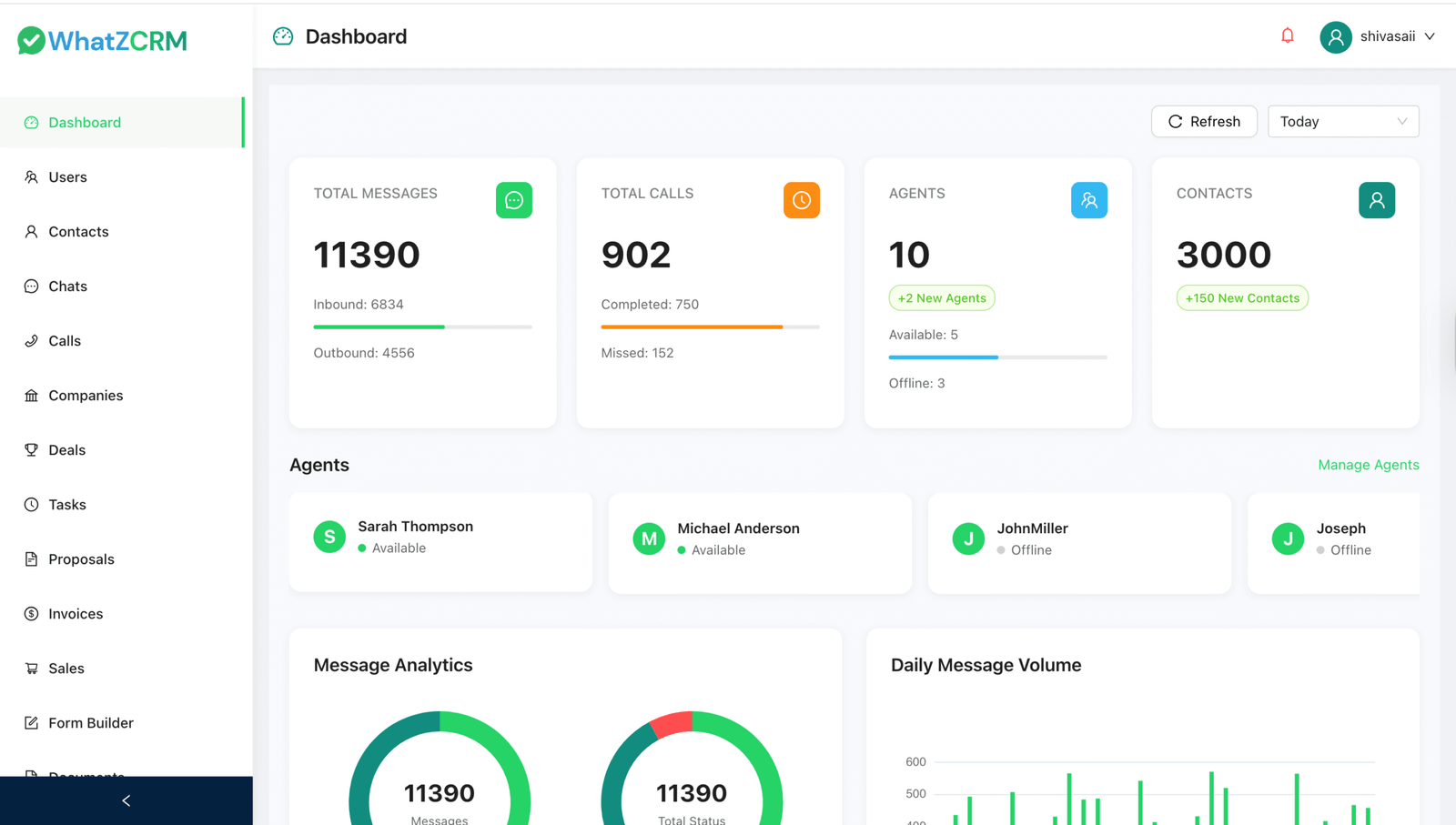
Step 4: Set Up AI-Powered Automation
WhatZCRM allows businesses to automate responses and workflows. Here’s how:
- Configure Chatbots:
- Welcome messages for new leads
- FAQ automation for common customer queries
- Lead qualification messages
- Workflow Automation:
- Auto-assign leads to sales agents based on predefined rules.
- Schedule follow-ups and reminders
- Send drip campaigns and broadcast messages.
Automation saves time, ensures no leads are left unattended, and enhances the customer experience.
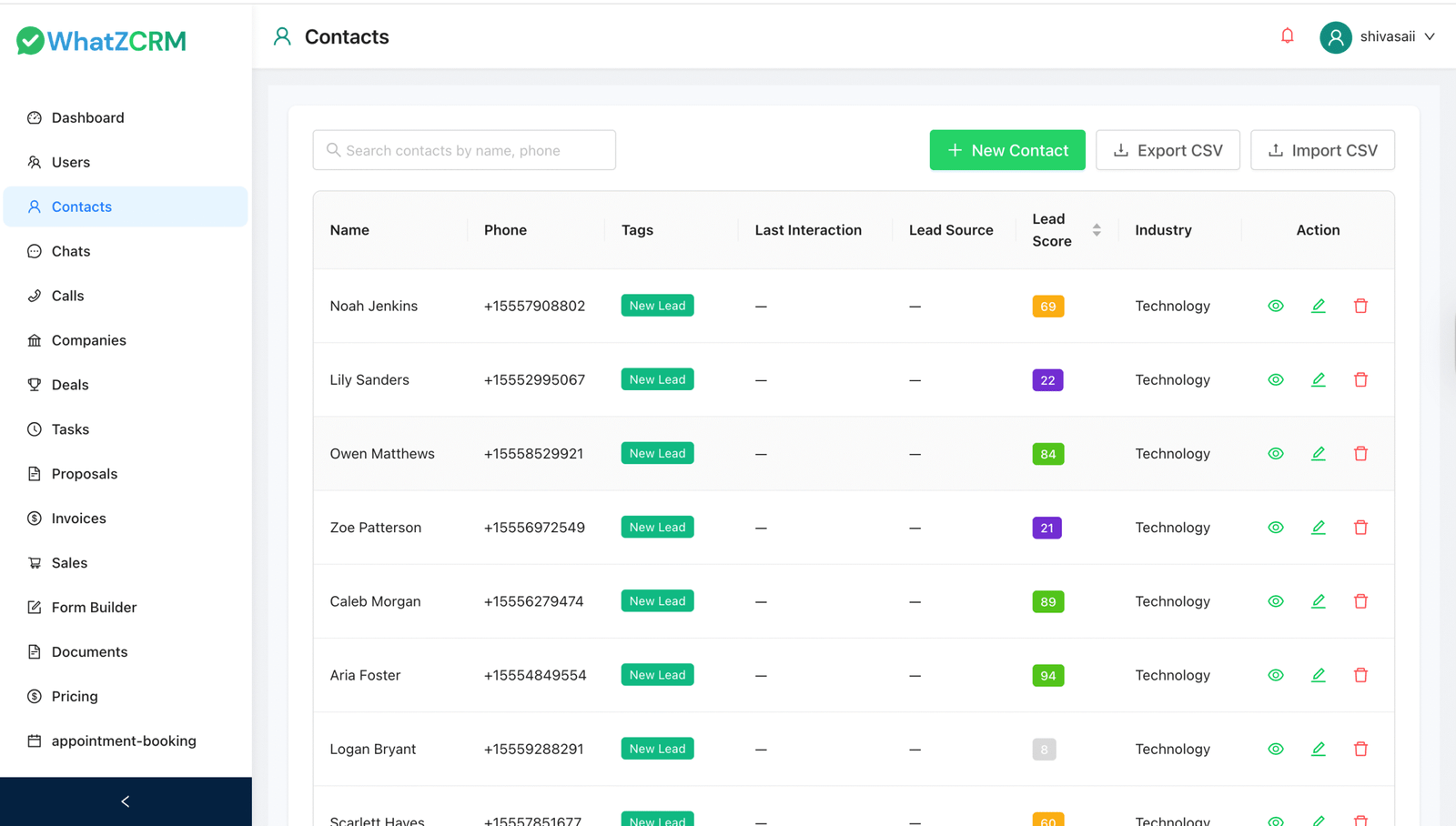
Step 5: Organize Contacts and Leads
Use WhatZCRM to manage leads efficiently:
- Tag contacts based on interest, location, or engagement.
- Score leads automatically based on interaction.
- Track conversations and customer activity timelines.
This structured approach ensures that sales teams can focus on high-potential leads while support teams deliver timely assistance.
Step 6: Implement Sales and Support Tools
With WhatZCRM:
- Sales Pipelines: Visualize the stages from WhatsApp lead generation to deal closure.
- Appointment Scheduling: Allow customers to book appointments via WhatsApp.
- Quotations and Invoices: Generate and send documents directly through WhatsApp.
- Team Management: Assign tasks, monitor agent performance, and collaborate seamlessly.
These tools enable businesses to streamline processes and increase efficiency.
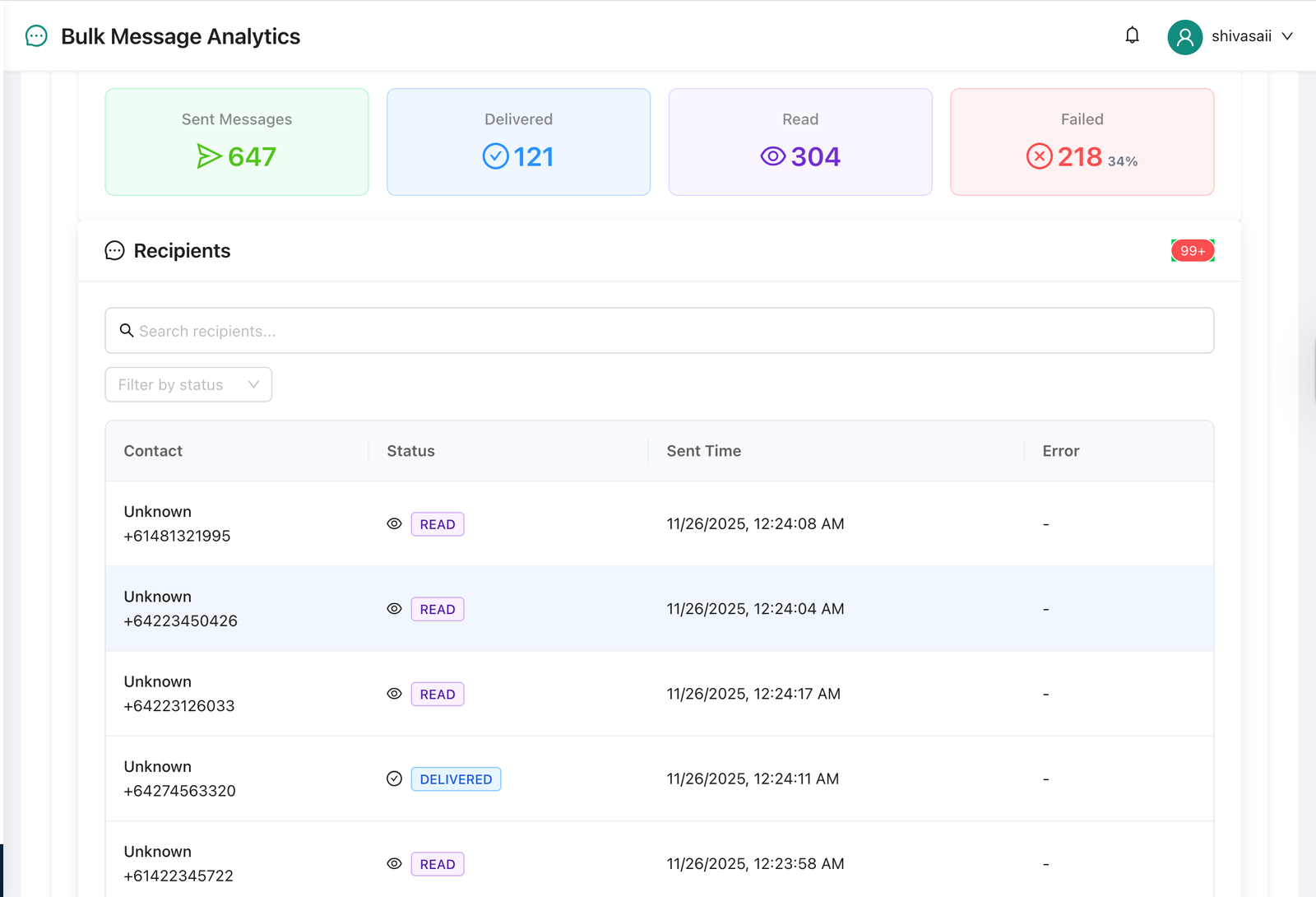
Step 7: Track Performance with Analytics
Measure your WhatsApp communication effectiveness with WhatZCRM’s analytics:
- Response times and agent performance
- Lead conversion rates
- Engagement metrics for broadcast campaigns
- Sales performance across pipelines
Data-driven insights help decision-makers optimize strategies and improve ROI.
Step 8: Scale Across Industries
WhatZCRM is versatile and caters to a wide range of industries:
- Healthcare: Automate patient follow-ups, appointment reminders, and lab report notifications.
- Real Estate: Manage property inquiries, schedule site visits, and automate lead nurturing.
- Education: Engage students, manage course queries, and send class updates.
- Service Businesses: Handle bookings, customer support, and post-service feedback efficiently.
Each industry benefits from automated workflows, centralized communication, and real-time reporting.
Also Read: Top 10 WhatsApp CRM Tools Compared (2026)
For Which Industry Can WhatZCRM Be Used?
WhatZCRM is best suited for:
- Business owners and founders looking to centralize communication
- Sales teams aiming to increase lead conversion
- Customer support teams seeking faster response times
- Healthcare, real estate, education, and service businesses
- Decision-makers evaluating WhatsApp CRM and automation solutions
If your business relies heavily on WhatsApp for customer communication, WhatZCRM offers a scalable, efficient, and intelligent solution.
Conclusion
In 2026, WhatsApp isn’t just a messaging app; it’s a business-critical communication tool. To unlock its full potential, businesses need more than a standard WhatsApp account. By integrating WhatsApp Business API with WhatZCRM, organizations can centralize communication, automate workflows, track leads, and boost overall efficiency.
Whether you are in healthcare, real estate, education, or any service industry, following this step-by-step setup guide ensures your business leverages WhatsApp effectively, improving customer satisfaction and driving sales growth.
Start your WhatsApp for business journey today with WhatZCRM, and transform how your business communicates with the world.