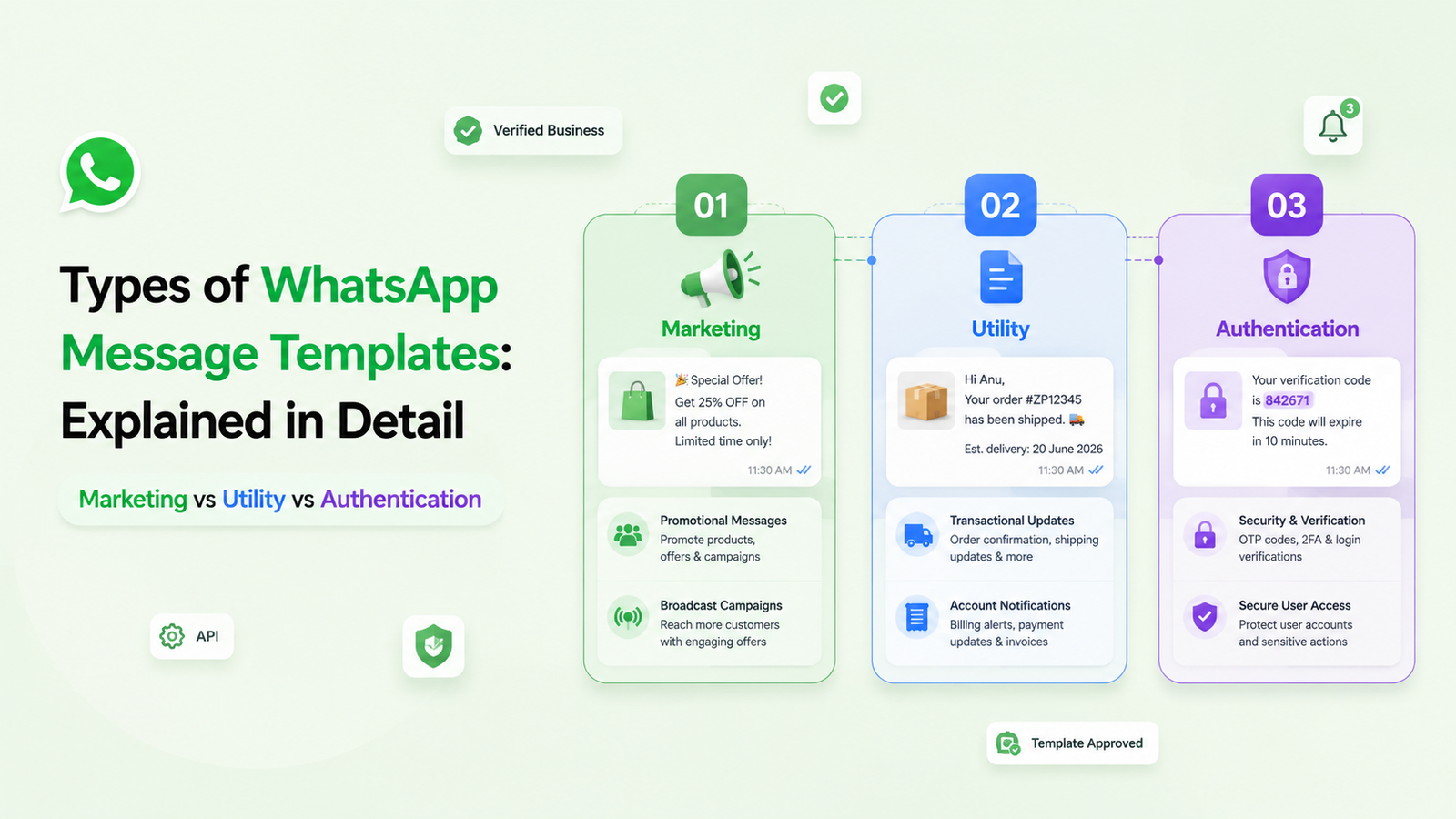

Every WhatsApp Business template you send falls into one of three buckets: Marketing, Utility, or Authentication, and Meta decides which one applies based on content, not on what you label it as. Get the category wrong, and you’ll either see your template rejected or pay far more than you need to, since marketing messages cost several times more per delivery than utility or authentication ones.
Since July 2025, Meta has also moved away from flat “per-conversation” billing to per-message pricing, so category accuracy now has a direct line to your monthly bill. Below is a plain-English breakdown of each category, what they cost in 2026, and how to structure your templates so Meta approves them the first time.
Table of Contents
ToggleWhat Are WhatsApp Template Categories, Really?
Before a business can message a customer outside an active chat, WhatsApp requires that message to use a pre-approved template. Every template submitted through WhatsApp Manager gets sorted into one of three categories:
Marketing, utility, or authentication. This isn’t a cosmetic label; the category determines your approval odds, your per-message cost, and even which messaging windows you’re allowed to use.
A lot of businesses treat category selection as a formality during template submission. It isn’t. Meta’s own review system checks the content of your template against its category rules, and if there’s a mismatch, you’ll see a “category doesn’t match” flag, a delay, or a rejection.
Also Read: How WhatsApp Business Greeting Message Works and 50+ Message Templates
Marketing Templates: Anything Meant to Sell or Engage
Marketing templates cover promotional and engagement-driven messaging, the kind meant to move someone toward a purchase or keep them interested in your brand. Think festive sale announcements, new product drops, re-engagement nudges to dormant leads, or event invites. If a message doesn’t clearly fit Utility or Authentication, Meta defaults it to Marketing, so this is effectively the catch-all category.
Marketing is also the most expensive category to send, and it carries no volume discount at any scale; Meta prices it this way deliberately to discourage mass promotional blasting.
Utility Templates: Transactional, Not Promotional
Utility templates exist to keep a customer informed about something they’ve already opted into or transacted on: order confirmations, shipping updates, appointment reminders, payment receipts, or subscription renewal notices. The defining test is simple: does the message reference a specific transaction or account action the customer already took? If yes, it’s Utility.
Utility templates are priced well below Marketing, and they’re free entirely when sent inside an open 24-hour customer service window (the period that starts when a customer messages you first).
Try WhatsApp Campaign Automation
Authentication Templates: Verification Only
Authentication templates have exactly one job: verifying identity. OTPs, login codes, password resets, and two-factor security checks all belong here. Meta restricts what you can include in these templates (no marketing copy, no extra links) specifically so they aren’t misused for promotion. In exchange, this is the cheapest category to send, often costing a fraction of a cent per message in markets like India.
How Are These Categories Priced in 2026?
This is where a lot of older guides, including help-center articles still being republished this year, get it wrong. Meta retired its old “conversation-based” pricing model (one flat fee per 24-hour conversation, regardless of how many templates you sent inside it) on July 1, 2025. Billing is now strictly per delivered template message, based on category and the recipient’s country code.
In practice: Marketing messages carry the highest per-message rate and no volume discount. Utility and Authentication rates run roughly 80–90% cheaper than Marketing in the same market, and both get progressively cheaper as your monthly volume crosses Meta’s tier thresholds. Service replies and utility templates sent inside an open customer service window remain free. The takeaway for any business running WhatsApp at scale: your bill isn’t just about how many messages you send; it’s about which category each one is filed under.
| Marketing | Utility | Authentication | |
| Purpose | Promotions, offers, re-engagement | Transaction & account updates | Identity verification (OTP, 2FA) |
| Approval strictness | Moderate | Moderate | Strict (verification content only) |
| Relative cost (2026) | Highest, no volume discount | 80–90% cheaper than Marketing | Lowest, often under $0.01 |
| Free in service window? | No | Yes | No |
| Common in WhatZCRM | Broadcast campaigns, drip sequences | Order & appointment automation | Login flows, secure sign-ups |
Getting the Category Right the First Time
Since your template’s category is locked to its content, not its intent, the safest approach is to write each template as narrowly as possible for its purpose. A shipping update with a discount code tacked on isn’t Utility anymore; it’s Marketing, and Meta will usually catch it. Keep transactional messages transactional, keep promotional messages clearly promotional, and keep verification messages free of anything but a code.
This is also where category strategy becomes a CRM problem, not just a template problem. Inside WhatZCRM, campaign templates, automated follow-ups, and lead-scoring triggers are managed from the same pipeline where deals, invoices, and proposals live, so when you’re deciding whether a message belongs in a drip sequence (Marketing) or an automated order update (Utility), it’s tied directly to where that contact sits in your deal stage, not sent as a one-off blast. That context is what keeps categorization consistent as your template library grows.
Also Read: Top 15 Ready-to-Use WhatsApp Templates for Automation
Conclusion
At the end of the day, WhatsApp template categories aren’t just a compliance checkbox; they decide what you’re allowed to send, how fast it gets approved, and what you pay for every single message. Marketing earns attention, Utility keeps transactions moving, and Authentication keeps accounts secure; mixing them up is usually what causes rejected templates or an inflated messaging bill. Get the category right from the start, and the rest of your WhatsApp strategy campaigns, follow-ups, and support runs a lot more predictably.
Frequently Asked Questions (FAQs)
WhatsApp template messages are classified into three categories: Marketing, Utility, and Authentication. Every template submitted through the WhatsApp Business API is reviewed by Meta and categorized based on its purpose and message content.
This typically happens when a transactional message contains promotional language, discount codes, product recommendations, or unrelated offers. To remain in the Utility category, the template should focus only on an existing customer transaction without marketing content.
Yes. Authentication templates are generally the lowest-priced category because Meta encourages businesses to use them for secure login verification, one-time passwords (OTPs), and identity verification. Marketing templates typically have higher messaging charges.
The template categories remain unchanged, but Meta introduced a per-message pricing model beginning July 1, 2025. Instead of charging per conversation, each delivered template message is billed individually based on its category and the recipient's country.
Yes. Utility template messages and free-form service replies sent within an active 24-hour customer service window are not charged. However, Marketing and Authentication template messages are billed regardless of whether the customer service window is open.