
ChatGPT prompts for WhatsApp are pre-written instructions that turn a blank chat window into a marketing writer, a sales follow-up assistant, or a support rep in seconds. This library organizes prompts by the moment they’re actually needed: first outreach, deal follow-up, proposal nudges, support replies, and chatbot scripting so you’re not digging through a wall of generic “marketing hacks” to find the one prompt that fits your situation right now.
What Are ChatGPT Prompts for WhatsApp?
A ChatGPT prompt for WhatsApp is simply an instruction you feed the model describing your business, your customer, and your goal so it returns message copy ready to send on WhatsApp. The output quality depends almost entirely on the input. A prompt that says “write a WhatsApp message” gets you something generic. A prompt that specifies the audience, the tone, the character limit, and the exact next action you want the customer to take gets you something that actually converts.
Most guides stop at promotional copy. But a WhatsApp conversation rarely ends at the broadcast; it moves into a lead reply, a proposal follow-up, a payment reminder, and eventually a support thread. The prompts below are grouped around that full journey.
Prompts for WhatsApp Marketing Messages
Use these when you need first-touch outreach or campaign copy.
- “Write 3 WhatsApp broadcast variations for [offer], targeting [audience]. Tone: [casual/urgent]. Under 160 characters, one CTA each.”
- “Turn this promotional message into a value-first update a customer would want to read: ‘[message]’.”
- “Write a WhatsApp message announcing [product/event] with a curiosity-driven opening line and a single clear next step.”
Prompts for WhatsApp Sales Follow-Ups and Deal Stages
This is where most WhatsApp content stops short, because most tools treat WhatsApp as a broadcast channel, not a pipeline. If you’re tracking leads through stages- new, contacted, proposal sent, negotiation, won your follow-up messages should reflect exactly where the deal sits, not a generic nudge.
- “Write a WhatsApp follow-up for a lead who received a proposal 3 days ago and hasn’t replied. Tone: helpful, not pushy. Reference the proposal without re-pitching it.”
- “Write a message reminding a customer about an unpaid invoice due in 2 days. Keep it professional, friendly, and include a one-line payment nudge.”
- “Draft a WhatsApp check-in for a lead marked ‘negotiation’ in my pipeline who went quiet after a price discussion. Offer one small concession or next step.”
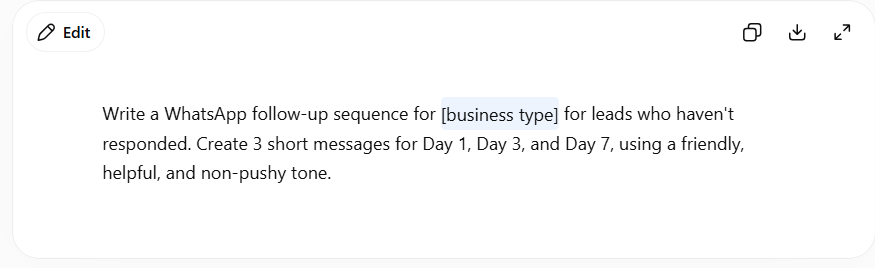
- “Write a message to re-engage a lead that’s been sitting untouched for 14 days, referencing their original interest without sounding like a cold restart.”
Pairing prompts like these with a platform that already knows each contact’s deal stage, like WhatZCRM pipeline and lead management tools, means you’re not manually checking a spreadsheet before writing each message. The stage tells you what to ask ChatGPT for.
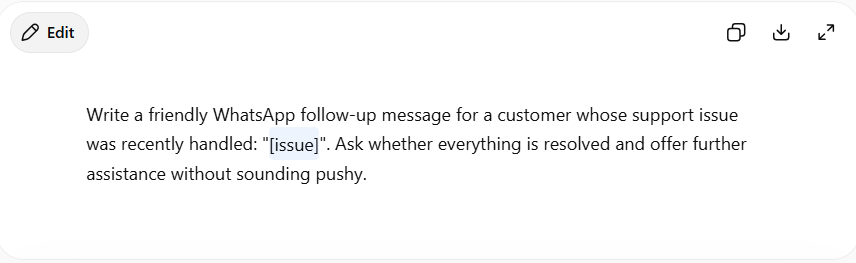
Prompts for WhatsApp Customer Support Replies
- “Write an empathetic reply to this complaint: ‘[complaint]’. Acknowledge the issue, avoid admitting fault, offer a next step, under 200 characters.”
- “Write 3 short WhatsApp replies for a delayed order query, ranging from formal to casual, so I can pick the right tone for this customer.”
- “Summarize this WhatsApp conversation thread in 2 sentences for an internal handover note to another support agent.”
Prompts for WhatsApp Chatbot Scripts
- “Build a WhatsApp chatbot flow for [business type] with a welcome message, 3 quick-reply options, lead capture fields, and a human handover trigger.”
- “Write 3 fallback responses for when a WhatsApp chatbot doesn’t understand a customer’s message, matching a friendly brand tone.”
How to Get Better Results From These Prompts
The gap between a flat, generic reply and one that sounds like your brand almost always comes down to context. Before running any prompt above, tell ChatGPT who you are in three sentences: your brand tone, your typical customer, and what “good” looks like for this message. Save that as a reusable block and paste it at the top of every session; it saves the back-and-forth of re-explaining your business every time.
It also helps to treat the pipeline-stage prompts differently from the broadcast prompts. A cold outreach message can be punchy and short. A deal-stage follow-up needs to reference specifics: what was sent, when, and what’s still outstanding, or it reads as an obvious template. That specificity is usually the difference between a reply and a read-and-ignore.
Final Thoughts
None of these prompts replace a genuine understanding of your customer; they just remove the blank-page problem. The real gain isn’t in any single message ChatGPT writes for you; it’s in having the right prompt ready for the moment you’re actually in, whether that’s a cold lead, a proposal gone quiet, or an overdue invoice. Build a small library of the ones that consistently work for your business, and WhatsApp stops being a channel you write for and starts being one you run on autopilot.
Want these follow-ups to fire automatically based on where each lead sits in your pipeline? Start a free WhatZCRM trial and connect deal stages directly to your WhatsApp messaging.