
Marketing agencies live and die by speed. A lead that waits 30 minutes for a reply is a lead your competitor just closed. In 2026, the agencies pulling ahead aren’t the ones with the biggest budgets; they’re the ones responding fastest, on the right channel. That channel is WhatsApp.
But here’s the problem most agencies run into: WhatsApp alone isn’t enough. Managing dozens of leads across a personal WhatsApp number or even the WhatsApp Business App quickly becomes chaos. Messages get buried. Follow-ups get missed. And there’s no way to tell which deals are moving and which have gone cold.
That’s exactly where a WhatsApp CRM for marketing agencies changes the game.
What Is a WhatsApp CRM for Marketing Agencies?
A WhatsApp CRM for agencies is a platform that integrates the WhatsApp Business API with a full sales pipeline, allowing marketing teams to capture leads, assign conversations to agents, automate follow-ups, and track every deal from the first message to the signed contract, all without leaving WhatsApp.
It is not the same as a WhatsApp chatbot or a basic automation tool. A WhatsApp CRM combines:
- A multi-agent shared inbox so your whole team works from one WhatsApp number
- A visual sales pipeline to track deal stages in real time
- Automated workflows for lead qualification, follow-ups, and reminders
- Analytics and reporting so you know exactly where deals are stalling
Think of it as combining the speed of WhatsApp with the structure of a proper CRM like HubSpot or Salesforce, but built specifically for conversational selling.
Why Marketing Agencies Are Moving to WhatsApp
If you’re still relying on email as your primary lead channel, consider what the numbers say:
- WhatsApp messages have a 98% open rate, compared to just 21% for email (Chatarmin, 2026)
- 66% of consumers who start a WhatsApp conversation with a business go on to make a purchase (Our Own Brand, 2026)
- WhatsApp campaigns achieve conversion rates between 45% and 60%, outperforming traditional email marketing (Amra & Elma, 2025)
- Companies that respond to leads within 5 minutes are 21× more likely to qualify them than those that wait 30 minutes (Harvard Business Review, updated 2024)
- 56% of users abandon a purchase if a business is slow to respond on WhatsApp (Chatarmin, 2026)
- WhatsApp chatbots can increase lead generation by over 500%
For marketing agencies handling inbound leads from ads, landing pages, and referral networks, these numbers represent a significant competitive edge if you have the right infrastructure to take advantage of them.
Also Read: What Are the Key Benefits of WhatsApp Marketing in 2026?
The Problem with WhatsApp Business App (and Why Agencies Outgrow It Fast)
Most agencies start with the free WhatsApp Business App. It works fine for freelancers or very small teams. But as soon as you have more than two people handling leads, it breaks down:
- Single-device limitation: Only one person can be logged in at a time. When your sales manager is off, nobody can access conversations.
- No pipeline visibility: You have no way to see which leads are in negotiation, which proposals are pending, or which deals went cold last week.
- Manual everything: Follow-ups depend on someone remembering to send them. Reminders live in someone’s head or a separate spreadsheet.
- Zero analytics: You can’t report on response times, conversion rates, or agent performance.
- Conversations get siloed: When a client switches from one agent to another, context is lost, and they have to repeat themselves.
These limitations are manageable with five leads a week. With fifty, they become revenue-killers.
WhatsApp CRM vs WhatsApp Business App vs API Tools: What’s the Difference?
Feature | WhatsApp Business App | API Automation Tool | WhatsApp CRM |
Multiple agents | ✗ | Partial | ✓ |
Sales pipeline tracking | ✗ | ✗ | ✓ |
Automated follow-ups | Basic | ✓ | ✓ |
Lead assignment & routing | ✗ | ✗ | ✓ |
Conversation history & logs | Limited | Limited | ✓ |
AI lead qualification | ✗ | ✗ | ✓ |
Analytics & reporting | ✗ | Basic | ✓ |
CRM integration | ✗ | Varies | ✓ |
Best for | Solo operators | Developers | Sales teams |
Top WhatsApp CRM Tools for Marketing Agencies (2026 Comparison)
Several platforms compete for this space. Here’s how the most prominent options compare for marketing agency use cases:
1. WhatZCRM
An AI-powered WhatsApp CRM built for sales teams. Strong on pipeline management, multi-agent inbox, and automated follow-up workflows. Designed specifically for conversational selling rather than bulk broadcast messaging.
Best for: Agencies focused on closing deals and managing inbound leads.
2. WATI
One of the more established players in the WhatsApp API space. Good template management, chatbot builder, and broadcast features. Better suited for customer support use cases than pure sales pipeline management.
Best for: Agencies that also need customer support ticketing alongside sales.
3. Interakt
Popular in South Asian markets. Affordable pricing, solid broadcast and notification features, and basic CRM integration. Less sophisticated in deal tracking compared to dedicated CRM tools.
Best for: Small- to mid-sized agencies on tighter budgets.
4. Respond.io
A multi-channel messaging platform that supports WhatsApp, Instagram, Messenger, and more in a unified inbox. Very strong on routing and automation. Can be complex to set up.
Best for: Agencies managing leads across multiple messaging channels simultaneously.
Also Read: Detailed Overview of Top 5 WhatsApp Automation Tools: Features, Benefits & Comparison
How a WhatsApp CRM Closes Deals Faster: The Step-by-Step Workflow
Here’s how a marketing agency running a WhatsApp CRM typically handles a lead from first contact to signed contract:
Step 1 — Capture. A prospect clicks a Click-to-WhatsApp ad or fills a landing page form. Their details flow automatically into the CRM, and a WhatsApp conversation opens.
Step 2 — Instant engagement. A personalized greeting fires immediately within seconds, not hours. This matters because response time within the first five minutes increases the likelihood of qualification by 21×.
Step 3 — AI qualification. A chatbot asks 3–5 qualifying questions, such as “What service are you looking for?” What’s your monthly ad budget? What’s your timeline? High-intent leads get flagged for immediate human follow-up. Others enter a nurture sequence.
Step 4 — Agent assignment. The qualified lead is routed to the appropriate team member: SEO leads to the SEO team, PPC leads to the performance team, and so on. The entire conversation history is visible to whoever picks it up.
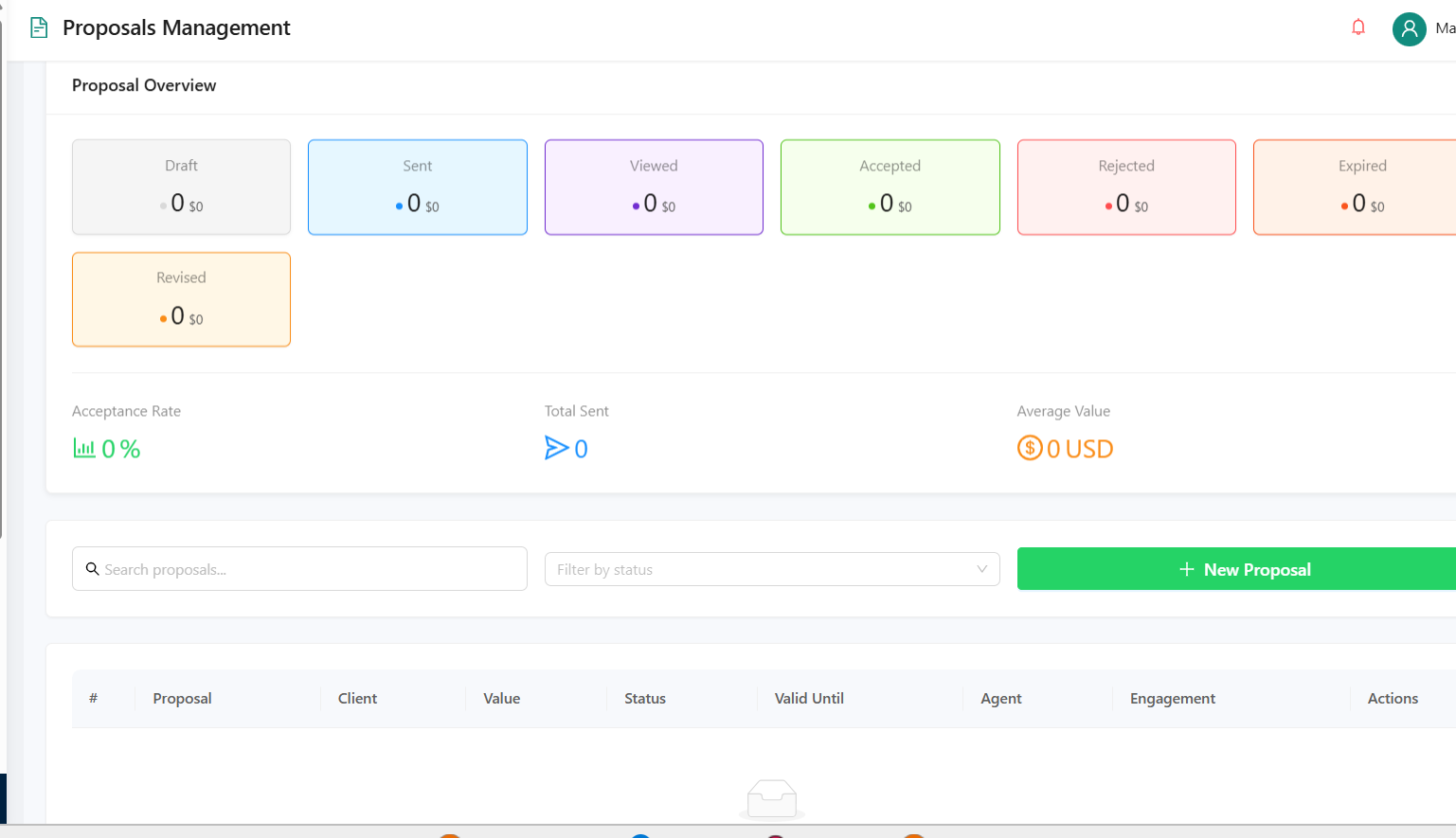
Step 5 — Proposal and follow-up. The sales agent sends proposals, case studies, pricing decks, and video walkthroughs directly in WhatsApp. If the prospect goes quiet, automated reminders are triggered on days 2, 5, and 10, so the agent doesn’t have to remember.
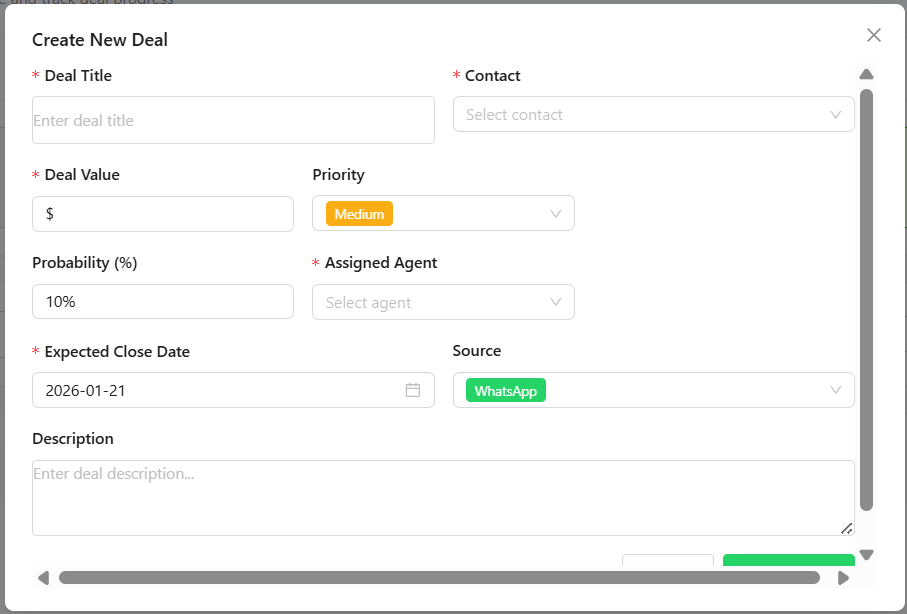
Step 6 — Pipeline tracking. Every deal sits in a visual pipeline: New Lead → Qualified → Proposal Sent → Negotiation → Closed. Managers see the full picture at a glance.
Step 7 — Closed and onboarded. Once the deal closes, onboarding messages and welcome sequences begin automatically. No handoff confusion.
Also Read: How to Use AI Workflows Inside WhatsApp CRM
Key WhatsApp CRM Features Marketing Agencies Should Prioritize
Not all WhatsApp CRM platforms are built the same. When evaluating tools, marketing agencies should look for:
Multi-agent shared inbox. Your whole team manages leads from a single business WhatsApp number. No more multiple personal numbers creating confusion.
Lead tagging and segmentation. Tag leads by service interest (SEO, PPC, social media, branding), deal size, or source (Facebook ad, referral, organic). Use these tags to automatically trigger the right follow-up sequence.
Automated drip campaigns. Pre-built sequences that nurture leads who aren’t ready to buy yet, sending educational content, case studies, and soft CTAs over 7–30 days.
Sales pipeline with deal stages. A Kanban-style or list-style view showing where every deal stands. Essential for weekly pipeline reviews.
Response time analytics. Track how quickly your team is responding to new leads. The 5-minute window is measurable; you should be measuring it.
Conversation assignment and handoff. When a lead asks a technical question, the conversation should move to the right person without the client noticing the switch.
WhatsApp template management. Pre-approved message templates for proposals, follow-ups, and reminders so your team isn’t drafting from scratch every time.
Also Read: Top 10 WhatsApp CRM Tools Compared (2026)
Common Mistakes Marketing Agencies Make with WhatsApp CRM
Even with the right tool, agencies often make mistakes that limit results:
Using WhatsApp for broadcasting, not conversing. Sending mass promotional messages feels spammy and gets blocked. WhatsApp CRM works best for responsive, personalized conversations triggered by inbound intent.
Also Read: What Do We Know About WhatsApp CRM and How it Works
Skipping lead qualification. Not all leads deserve the same response time. Build qualification into your chatbot flow so your best salespeople spend time with high-intent prospects.
No follow-up sequences. Most deals don’t close on the first conversation. Without automated follow-ups, you’re leaving money on the table every week.
Not measuring response times. If you’re not tracking how quickly you respond to new leads, you have no way to improve it, and slow response times are the leading cause of lead drop-off on WhatsApp.
Treating WhatsApp like email. Long messages don’t work on WhatsApp. Keep communications concise, visual, and conversational. Save the full proposal for a PDF link or a follow-up call.
How to Set Up Your First WhatsApp CRM Pipeline (Without a Developer)
Getting started with a WhatsApp CRM doesn’t require a technical team. Here’s a practical setup path for most marketing agencies:
- Get verified on WhatsApp Business API. Apply through a Business Solution Provider (BSP); most CRM platforms handle this during onboarding.
- Connect your existing lead sources. Link your Facebook/Instagram ads, landing page forms, and website chat widget to automatically route leads into WhatsApp.
- Build your qualification chatbot. Create a 3–5-question flow that captures the service need, budget range, and timeline. Most platforms have visual builders, no coding needed.
- Set up your pipeline stages. Define your deal stages based on how your agency actually sells. A typical setup: New Inquiry → Qualified → Proposal Sent → Follow-up → Closed Won / Closed Lost.
- Create your follow-up sequences. Build at least three automated follow-ups for proposals: Day 2 (quick check-in), Day 5 (address common objections), Day 10 (final nudge with a case study or testimonial).
- Assign team roles. Set up routing rules so leads automatically go to the right agent based on service type, lead source, or deal size.
- Review and optimize weekly. Check response times, pipeline velocity, and drop-off points. Even small improvements to response speed or follow-up timing compound significantly over time.
Final Thoughts
Marketing agencies that are still managing leads through personal WhatsApp numbers, shared inboxes with no structure, or email-first workflows are working harder than they need to and losing deals they should be winning.
The shift to WhatsApp as a primary sales channel isn’t a trend. It’s where client expectations have already landed. A 98% open rate and 21× faster lead qualification with sub-5-minute response times aren’t theoretical; they’re the benchmarks agencies using WhatsApp CRM are actually hitting.
The question isn’t whether your agency should use WhatsApp CRM. It’s which platform fits your workflow, and how quickly you can get your pipeline structured around it.