
Managing customer conversations across multiple agents can become difficult as a business grows. A customer sends a WhatsApp message, another customer needs a follow-up, a sales agent has to prepare a proposal, and someone else may need to generate an invoice.
When these activities are handled through separate chats, spreadsheets, or verbal instructions, it becomes difficult for managers to know who is handling what.
This is where task assignment inside a WhatsApp CRM can help.
WhatZCRM is not a standalone project or task management tool. Instead, task assignment is a built-in feature of its WhatsApp CRM that helps admins and managers assign internal work to agents while keeping customer conversations, leads, deals, proposals, and invoices connected in the same environment. WhatZCRM also provides a unified team inbox where businesses can assign conversations and collaborate on customer chats.
In this guide, we’ll explain how task assignment works in a WhatsApp CRM and how businesses can use it to coordinate agents and move customer requests from conversation to action.
What Is Task Assignment Software for Teams?
Task assignment software allows managers or admins to create internal tasks and assign them to specific team members.
In WhatZCRM, task assignment is part of the wider WhatsApp CRM workflow. It is designed to help businesses manage work that comes from customer conversations and sales activities rather than replace a dedicated project management platform.
For example, when a customer sends a message on WhatsApp, an admin can check the conversation, see which agents are available or already handling chats, and assign the conversation to the appropriate agent. If additional work is required, the admin can create a task for that agent.
The task could involve:
- Following up with a customer
- Calling a customer
- Preparing a deal
- Updating a sales opportunity
- Creating a proposal
- Generating an invoice
- Completing a customer request
- Following up after a conversation
- Handling another internal action related to a customer
This creates a simple connection between customer communication and internal team execution.
How Does Task Assignment Work in WhatZCRM?
A typical workflow can look like this:
Customer sends a WhatsApp message → Admin reviews the conversation → Admin checks agent availability → Chat is assigned → Internal task is created if required → Agent completes the task → Manager monitors progress
Step 1: A Customer Sends a WhatsApp Message
A customer starts a conversation through WhatsApp.
The message appears in the shared WhatsApp inbox, where the team can manage customer conversations from a centralized view. WhatZCRM supports team inbox functionality for assigning conversations and collaborating between agents.
Step 2: The Admin Checks the Team
The admin can review incoming conversations and determine which agent should handle the customer.
For example, an admin may check:
- Which agents are available
- Which agents are already handling conversations
- Which department should handle the request
- Which agent is appropriate for the customer or lead
WhatZCRM supports agent assignment and routing workflows for team conversations.
Step 3: The Admin Assigns the Chat
Once the right agent is identified, the admin can assign the customer conversation to that agent.
This gives the agent clear ownership of the conversation instead of leaving the message for someone to notice in a shared chat.
Step 4: The Admin Creates an Internal Task
Some customer conversations require more than a reply.
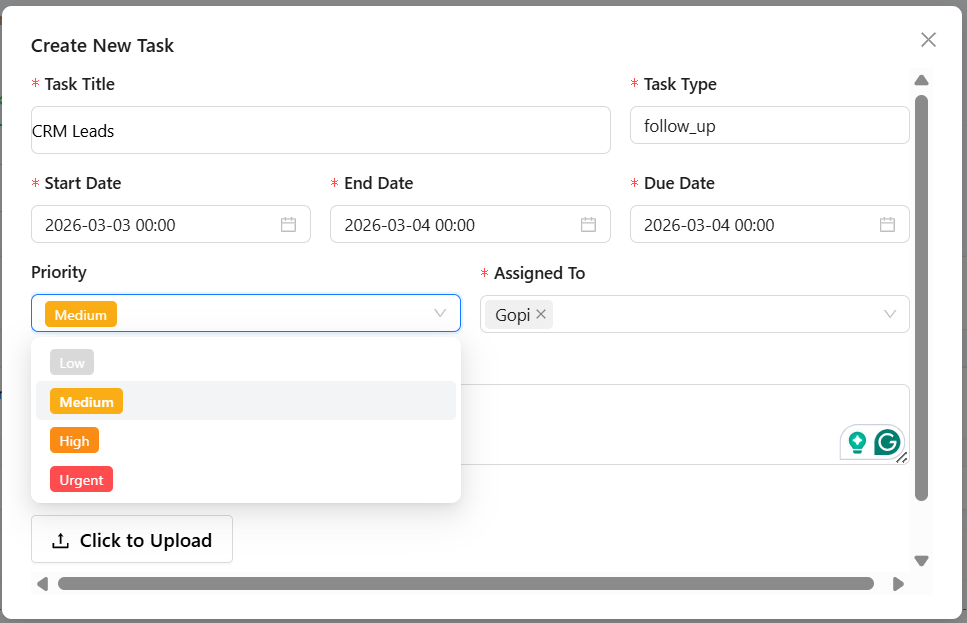
For example, a customer may ask for a quotation. The admin can create an internal task for the responsible agent to prepare or follow up on the quotation.
Other tasks could include:
- Call the customer
- Follow up tomorrow
- Update the deal
- Prepare a proposal
- Generate an invoice
- Check customer requirements
- Follow up on payment
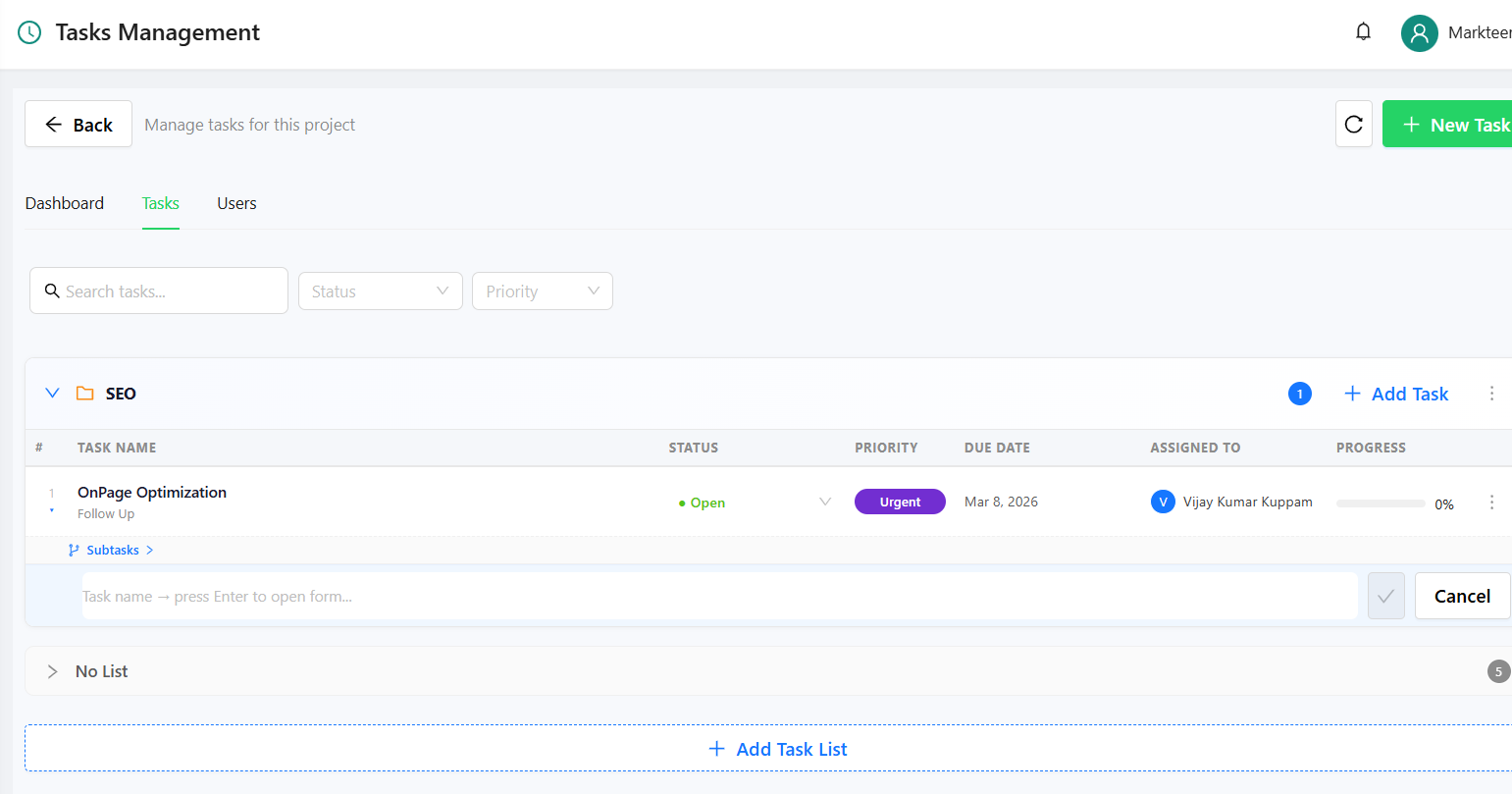
WhatZCRM’s task management supports assigning tasks to team members, along with priorities and deadlines.
Step 5: The Agent Completes the Task
The assigned agent can work on the task and update its progress.
This makes responsibility clearer because the task has a specific owner rather than being left as an informal instruction inside a WhatsApp conversation.
Step 6: The Admin Tracks the Work
The admin or manager can monitor assigned work and follow up when necessary.
The goal is not to replace a full project management system. Instead, task assignment helps connect the work that agents need to complete with the customer conversations and CRM activities already being managed in WhatZCRM.
Why Is Task Assignment Important for WhatsApp Teams?
WhatsApp is useful for customer communication, but a customer message does not always mean the work is finished.
A simple message such as:
“Please send me the quotation.”
may require several internal actions.
Someone needs to prepare the quotation, another person may need to review it, and the sales agent may need to follow up with the customer.
Without a clear internal task, these actions can easily become delayed.
Task assignment helps answer three simple questions:
- Who needs to handle this?
- What needs to be done?
- When does it need to be completed?
This gives managers better visibility into work that starts from customer conversations.
How Does Task Assignment Simplify Team Work?
1. Gives Every Task a Clear Owner
When an admin assigns a task to a specific agent, responsibility becomes clear.
Instead of telling the whole team, “Someone please follow up with this customer,” the manager can assign the work directly to the appropriate person.
2. Connects Customer Chats With Internal Work
One of the biggest advantages of task assignment inside a WhatsApp CRM is the connection between communication and execution.
A customer conversation can lead to an internal task, a deal, a proposal, or an invoice without requiring the team to move the entire workflow into another application.
WhatZCRM connects its WhatsApp conversations with CRM capabilities such as deal management, task management, proposal creation, and invoice management.
3. Helps Admins Distribute Work
When several agents are handling WhatsApp conversations, an admin needs visibility into who is available and who is already busy.
By checking team activity before assigning conversations or tasks, managers can distribute work more deliberately instead of sending every new request to the same person.
WhatZCRM’s unified inbox includes agent visibility and routing capabilities designed for team-based WhatsApp communication.
4. Makes Follow-Ups Easier to Track
A customer may ask for a callback today but need a follow-up tomorrow.
Instead of depending on an agent’s memory, the team can create an internal task with a due date or reminder.
WhatZCRM includes task assignment, reminders, priorities, and deadline-related functionality as part of its WhatsApp CRM workflow.
5. Keeps Sales Activities Connected
Customer conversations often lead to sales activities.
For example:
WhatsApp inquiry → Qualified lead → Deal → Proposal → Invoice → Follow-up
Task assignment can support the internal work required at different points in this process.
This is particularly useful for businesses where sales agents communicate with customers primarily through WhatsApp.
What Types of Tasks Can Teams Assign?
The exact task depends on the business workflow and the customer’s request.
Common examples include:
Customer Requirement | Internal Task |
Customer requests a callback | Assign a call-back task to an agent |
Customer asks for pricing | Assign a pricing follow-up |
Customer wants a quotation | Assign proposal/quotation work |
Lead is ready to purchase | Create or update the deal |
Customer needs an invoice | Assign invoice-related work |
Customer has not responded | Create a follow-up task |
Customer needs additional information | Assign the request to the relevant team member |
The important point is that these tasks are internal actions connected to customer and CRM workflows, rather than general-purpose personal or project-management tasks.
This distinction is important when evaluating WhatZCRM. WhatZCRM is not positioned here as a replacement for every project-management application. Its task assignment feature is designed to help WhatsApp-based teams organize and execute internal work around customer interactions.
Why Use Task Assignment Inside a WhatsApp CRM?
For businesses that rely heavily on WhatsApp, the main benefit is context.
An agent does not just receive a task without knowing why it exists.
The task can be part of a wider customer workflow involving:
- Customer conversations
- Contact information
- Lead status
- Sales deals
- Follow-ups
- Proposals
- Invoices
- Team assignments
WhatZCRM’s unified inbox is designed to bring conversations, team assignment, collaboration, and CRM context together in one environment.
This can reduce the need to repeatedly move information between WhatsApp conversations and separate internal systems.
Who Can Benefit From Task Assignment in WhatZCRM?
Task assignment can be useful for teams where customer conversations regularly create internal work.
Examples include:
- Sales teams
- Customer support teams
- Real estate teams
- Education and admissions teams
- Agencies
- Service businesses
- E-commerce businesses
- Freelancers working with clients
- Small and growing businesses with multiple WhatsApp agents
For example, agencies can assign work to account managers, copywriters, designers, or other team members while managing client communication through WhatsApp.
What Makes WhatZCRM Different?
The key difference is not simply having a task feature.
The value comes from placing task assignment inside a broader WhatsApp CRM workflow.
With WhatZCRM, businesses can manage customer conversations and team collaboration while also working with CRM functions such as contacts, leads, deals, tasks, proposals, and invoices.
The workflow can therefore move from:
Conversation → Assignment → Task → Deal → Proposal → Invoice
without treating every step as an isolated activity.
For teams that manage customers primarily through WhatsApp, this approach can make internal coordination more connected to the actual customer journey.
Conclusion
Task assignment does not have to mean using a separate project management platform.
For WhatsApp-focused businesses, the more important requirement is often connecting customer conversations with the internal work those conversations create.
A customer sends a message. An admin checks the conversation and agent availability. The chat is assigned to the right person. If additional work is required, the admin creates a task, assigns it to an agent, and tracks the work as it moves forward.
That task could involve a customer call, follow-up, deal update, proposal, invoice, or another internal action.
This is where WhatZCRM’s task assignment feature fits into its broader WhatsApp CRM.
Rather than positioning task management as a standalone product, WhatZCRM connects internal team tasks with WhatsApp conversations, customer records, deals, proposals, and invoices, helping teams manage the work that happens around customer communication.
For businesses managing multiple agents and a high volume of WhatsApp conversations, this connected workflow can make it easier to know who is handling the customer, what needs to happen next, and who is responsible for completing it.